Make Package
Video
Guide
TUT03 — Build a Terminux Package for Your EDA Tool
This guide shows how to integrate an EDA tool with Terminux by writing your own Package. The worked example is Yosys, an open-source RTL synthesis tool. In the design flow it sits in the same broad tool category as Cadence Genus and Synopsys Design Compiler, but their features, commands and logs are different; this is not a 1:1 equivalence.
What runs in this lesson: only a Yosys hierarchy check (hierarchy -check): does the top module reference any RTL module that was not loaded? It is a preflight, not synthesis, timing or sign-off.
Glossary.
- Package: your own Python handler plus a manifest. Terminux calls it after a matching tool command finishes; it interprets the result and reports one line.
when.tools: the manifest field naming which tool's runs the Package follows.afterhandler: the Python function that reads the evidence (here the-llog and the exit code).PhaseResult: what the handler returns:ok,warn,failornoop, plus a message.- Offline cases (
package-tests): prepared logs that check the handler before install. Passing them does not mean your RTL is fine. DISPATCH_READY: configuration is ready; only a real run proves the integration.
Prerequisites
- Terminux is installed and its command scripts (for example
terminux-tool,terminux-package-new) are on yourPATHin the Terminux terminal. - A working Yosys executable is installed and found on your
PATH. Installing Yosys is not part of this tutorial. It was tested with Yosys 0.68+post (git a5af9d69); other versions were not tested. See Getting Yosys below. - You use bash in the Terminux terminal. The tutorial was recorded in bash; the tcsh notes were not tested.
- You have the tutorial files unpacked as
~/TUT03_learner_assets/(see Tutorial files below). - Optional, for section 1A and step 3 of section 7: Terminux AI set up with a model provider. Setting it up is not part of this tutorial; everything else works without it.
- The commands use the paths from the recorded demo (
~/tut03/...,~/TUT03_learner_assets/...). If your files or your Yosys installation are somewhere else, use your own paths.
Terminal language. The Terminux terminal starts with the language setting 繁體中文 (zh-Hant). To switch: right-click inside the terminal → Language → English (shown in the video). In this tutorial every command and Package message is English either way: we ran all section 1–5 commands under both settings and saw the same text.
Getting Yosys (prerequisite, not part of this tutorial)
This tutorial assumes Yosys is already installed by you or your CAD/tool administrator. Check it with the first commands of section 0. Possible sources, none verified with this tutorial: your site's tool installation; the YosysHQ OSS CAD Suite binary releases; building from the YosysHQ source repository; your Linux distribution's package (Ubuntu 24.04 apt offers an older version, 0.33, and needs administrator rights). Different versions may print different log text; the Package reads ERROR:, Top module:, Used module: and End of script. lines. The Yosys binary used to record this tutorial is a private build and is not distributed.
Tutorial files
The tutorial files come as one archive, TUT03_learner_assets.tar.gz. Unpack it in your home folder with tar -xzf TUT03_learner_assets.tar.gz -C ~. You get this structure (section 0 checks it with ASSETS.sha256):
TUT03_learner_assets/
  ASSETS.sha256
  packages/
    yosys_hier_check/
      README.md
      __init__.py
      after.py
      package-tests/
        hierarchy_ok.yaml
        incomplete_log_warns.yaml
        log_missing_warns.yaml
        log_outside_workspace_warns.yaml
        missing_module_fails.yaml
        no_log_flag_warns.yaml
        non_wrapper_source_ignored.yaml
      package.yaml
  rtl/
    adder.v
    hier_check.ys
    top.v
Guide and video
The video follows the same path in scenes S01–S07. It has no chapter links; use this table to find the matching part.
| Video | What it shows | Guide |
|---|---|---|
| S01 | What the Package does | Introduction |
| S02 | The parts of an existing Package (optional) | 1 |
| S03 | Ask Terminux AI before writing the handler | 1A |
| S04 | Language, Yosys check, register, create, validate, install, activate | 0, 2–5 |
| S05 | Run Yosys and read the result | 6 |
| S06 | Break it, ask AI, fix it | 7 |
| S07 | Recap and adapting to another tool | 9 |
| — | Clean up (Guide only, not shown in the video) | 8 |
0. Before you start
Purpose. Confirm that Yosys and the Terminux commands are ready, and set the terminal language.
Where. The Terminux terminal (the GUI window), bash, any folder.
- Check that Yosys is found and which version it is:
command -v yosys
yosys -V
command -v yosys prints the path of your Yosys executable (yours will differ). yosys -V prints the version:
Expected (abridged) — yosys -V:
Yosys 0.68+post (git sha1 a5af9d690a43744bf6b2cc3dea2717c16b54621c, Release, GNU /usr/bin/g++ 13.3.0)
- Check the Terminux tool list. On a fresh profile, before you register anything, it ends with
No user tools registered.; tools you registered earlier are listed instead.
terminux-tool list
Expected (abridged) — terminux-tool list:
No user tools registered.
- Check that the tutorial files are complete:
cd ~/TUT03_learner_assets && sha256sum -c ASSETS.sha256
It prints one line per file, each ending in OK (14 files).
- Copy the tutorial RTL into a working folder. This assumes a fresh start: if
~/tut03/rtlalready exists,cp -rputs a second copy inside it (~/tut03/rtl/rtl). In that case rename or move your old folder first; this guide never deletes files for you.
mkdir -p ~/tut03 && cp -r ~/TUT03_learner_assets/rtl ~/tut03/rtl
The command prints nothing.
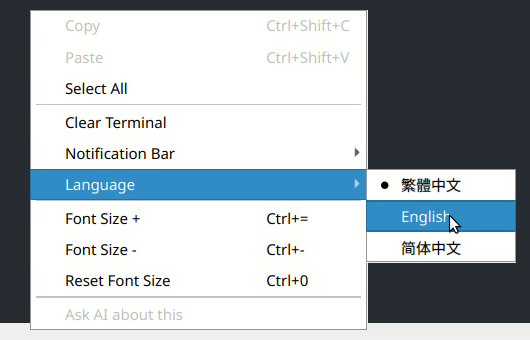
Figure. Language submenu at first start: 繁體中文 is checked (product default).
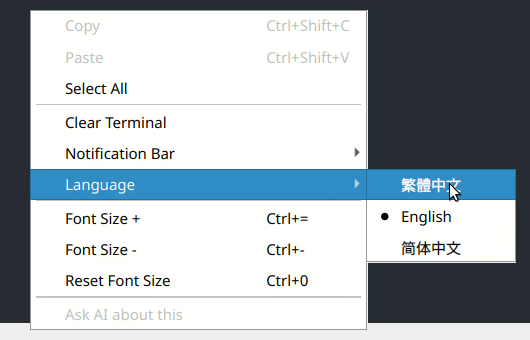
Figure. After choosing English, the menu shows English checked.
Success check. yosys -V prints a version line and every line of sha256sum -c ends in OK. If command -v yosys prints nothing, STOP: install Yosys or fix your PATH first.
1. Learn the pattern from an existing Package (optional)
Purpose. Optional detour: you can skip this section and go on to section 1A or 2; section 3 shows the same parts in your own Package. See the three parts every after-phase Package has, using the built-in icc2_shell_dqe example. It is marked FAKE: written for a fake tool, for structure only.
Where. Terminux terminal, bash. Run the first two lines in the same session.
- Copy the example into your own folder:
TX_PY=$(head -1 "$(command -v terminux-package-new)" | cut -c3-)
mkdir -p ~/tut03/reference && cp -r "$("$TX_PY" -c 'import os, terminux_engine.packages as p; print(os.path.dirname(p.__file__))')/icc2_shell_dqe" ~/tut03/reference/
cd ~/tut03/reference/icc2_shell_dqe
Helper: Helper written for this Guide: it finds the Python that runs the Terminux commands. It assumes the commands were installed from the Terminux Python wheel, as in the recorded demo; other install layouts were not tested. If it does not work for you, skip steps 1–3: section 3 shows the same parts (
package.yaml,after.py) in your own Package.
Helper: Helper written for this Guide: copies the built-in example into your own folder so you can read it safely. Run it in the same bash session as the line above.
Neither line prints anything.
- Read the manifest. Look for
when: tools:(which tool's runs this Package handles) andphases: after: after.run(the function Terminux calls after the tool finishes). Exit nano with Ctrl+X.
nano -v package.yaml
- Read the entry function
run(ctx): it checks which tool ran and returns aPhaseResult(ok,warn,failornoop).
nano -v +48 after.py
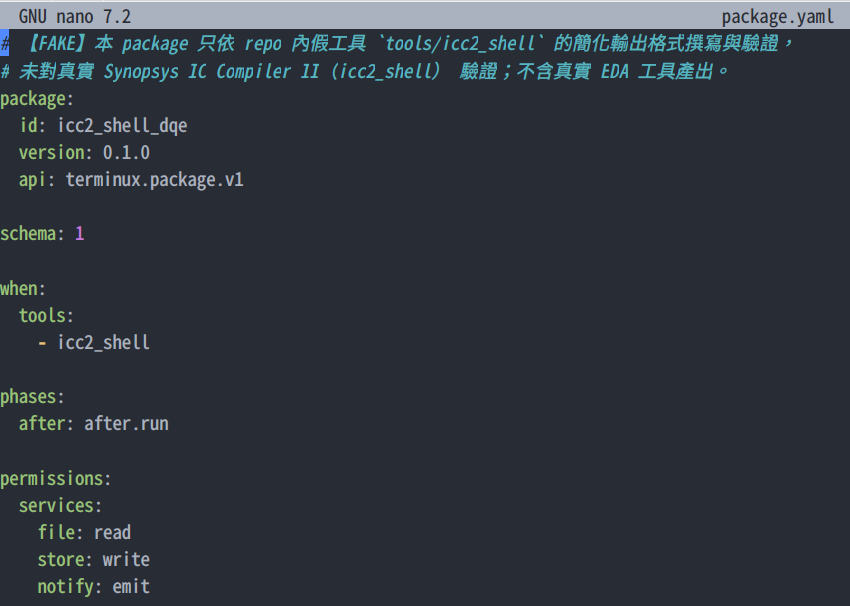
Figure. icc2_shell_dqe/package.yaml (FAKE example).
Success check. You can point to the manifest, the after handler and its result. The example's own tests are not shipped with the product, so this tutorial shows test cases in its own Package (section 3).
1A. Ask Terminux AI before you write the handler (optional)
Purpose. Get a checklist from Terminux AI, then check each point against real files before you rely on it.
Where. Terminux terminal, any folder. Needs Terminux AI with a model provider (see Prerequisites).
-
At the prompt, type
@@, a space and your question, then press Enter. This is the exact question used in the recording:@@ I am building a Terminux Python after-phase Package for a Yosys RTL hierarchy check. Which Package parts are reusable, which parts must be adapted to the Yosys command and log, and which checks should I test before installing it? -
The answer appears in the NotificationBar at the top of the window (in the recording, about 25 seconds after Enter) and stays in the bar's history. Answers vary by model and session; do not expect the same words. In a new session the AI may not see your files or logs. The recorded answer said so itself:
I can't tell you what your existing package looks like, because this turn has no tool access and the context above contains no package source, no Yosys command line, and no log sample.
-
Suggestions from the recorded answer that this tutorial uses (original wording):
Your parser must key on Yosys's actual strings, not on a generic "error" regex.
Clean design, correct top → expect pass, exit 0, zero unresolved modules.
Deliberately missing submodule → expect fail with the specific missing module named in your output.
-
Check each suggestion against the real files before you keep it:
Suggestion Where to check Result Key on Yosys's own log strings after.pylines 25–27 (ERROR:,Top module:,Used module:) and line 97 (End of script.)Matches Clean design → pass package-tests/hierarchy_ok.yamlexpectsokMatches Missing submodule → fail, naming the module package-tests/missing_module_fails.yamlexpectsfailwith the\addermessageMatches Corners, metrics, lineage artifacts (also in the answer) package.yamlhas onlywhen.toolsandphases.afterDoes not apply
Success check. For every suggestion you keep, you can name the file line or test case that shows it.
2. Register Yosys as your own tool
Purpose. Tell Terminux that yosys is your tool. This puts a small wrapper in front of it in your own ~/.terminux/bin; no administrator rights are needed and the built-in tool list is unchanged.
Where. Terminux terminal, bash.
cd ~/tut03/rtl
terminux-tool register yosys
Expected (abridged) — terminux-tool register yosys:
Registered user tool yosys (executables: yosys)
  ...
  wrapper link yosys: CREATED
Not active yet: run `terminux-package-status --activate` to load it into the running daemon.
Success check. wrapper link yosys: CREATED. It is not active yet; section 5 activates it.
3. Create the Package and add the handler
Purpose. Start from the supported scaffold, then replace its placeholder handler with the tutorial handler and add 7 test cases.
Where. Terminux terminal, bash.
- Create the Package skeleton:
mkdir -p ~/tut03/packages
terminux-package-new yosys_hier_check --root ~/tut03/packages --tool yosys
Expected (abridged) — terminux-package-new yosys_hier_check --root ~/tut03/packages --tool yosys:
Package Scaffold v1 — status=CREATED package_id=yosys_hier_check
  + __init__.py
  + package.yaml
  + after.py
  + README.md
validation: 0 error(s), 0 warning(s)
-
The generated
package.yamlalready containswhen: tools: [yosys]andphases: after: after.run. The generatedafter.pyis a placeholder that only returnsnoop:The generated
package.yaml(the same 13 lines as the tutorial copy):Complete file
package.yaml(13 lines).package: id: yosys_hier_check version: 0.1.0 api: terminux.package.v1 schema: 1 when: tools: - yosys phases: after: after.run
cd ~/tut03/packages/yosys_hier_check
nano -v after.py
- Replace it with the prepared tutorial handler and add the cases. (The video shows the prepared source; the full file is in
~/TUT03_learner_assets/packages/yosys_hier_check/after.py, 109 lines.)
cp ~/TUT03_learner_assets/packages/yosys_hier_check/after.py ~/tut03/packages/yosys_hier_check/after.py
cp -r ~/TUT03_learner_assets/packages/yosys_hier_check/package-tests ~/tut03/packages/yosys_hier_check/
ls package-tests
ls package-tests lists seven cases: hierarchy_ok.yaml, incomplete_log_warns.yaml, log_missing_warns.yaml, log_outside_workspace_warns.yaml, missing_module_fails.yaml, no_log_flag_warns.yaml, non_wrapper_source_ignored.yaml. If you repeat this step, cp -r puts the new copy inside the existing folder (package-tests/package-tests); rename or move the old folder yourself first.
- Read the decision part of the handler (lines 79–109): no
-llog →warn; log not readable →warn; anERROR:line →failwith the log line number; non-zero exit or noEnd of script.→warn; otherwiseokwith the top module and the submodules found. Events that did not come from the wrapper returnnoop(line 75).
nano -v +97 after.py
-
How the handler is built. The extracts below are real lines from
after.py; each one names its line range. They are not a complete file: the full handler is~/TUT03_learner_assets/packages/yosys_hier_check/after.py.What it imports from Terminux, and which Yosys log lines it looks for:
Extract from
after.py, lines 20–27 (not the complete file).from terminux_engine.package_runtime.context import PackageContext from terminux_engine.package_runtime.result import NotificationRequest, PhaseResult MAX_LOG_BYTES = 1_000_000 _LOG_FLAGS = ("-l", "--logfile", "-L", "--line-buffered-logfile") _ERROR_RE = re.compile(r"^ERROR:\s*(.+)$") _TOP_RE = re.compile(r"^Top module:\s+\\?(\S+)") _USED_RE = re.compile(r"^Used module:\s+\\?(\S+)")The entry point. Terminux calls
run(ctx)afteryosysfinishes; events that did not come through the wrapper are ignored:Extract from
after.py, lines 73–77 (not the complete file).def run(ctx: PackageContext) -> PhaseResult: event = ctx.event if event.source != "wrapper": return PhaseResult(status="noop", message=f"ignored event from source={event.source!r}") facts: dict = {"exit_code": event.exit_code, "command": event.command}Finding and reading the log named after
-l._read_log(lines 41–60) reads only a regular file inside the working folder, up to 1 MB:Extract from
after.py, lines 79–86 (not the complete file).name = _log_name(list(event.argv)) if name is None: return _result("warn", "Yosys ran without a log file; rerun with -l <file> so the hierarchy " "result can be checked", facts) facts["log"] = name text, problem = _read_log(event.cwd, name) if text is None: return _result("warn", f"cannot check the hierarchy: {problem}", facts)An
ERROR:line meansfail, with the log line number:Extract from
after.py, lines 88–95 (not the complete file).lines = text.splitlines() errors = [(number, match.group(1)) for number, line in enumerate(lines, 1) if (match := _ERROR_RE.match(line))] facts["error_count"] = len(errors) if errors: number, first = errors[0] return _result("fail", f"Yosys hierarchy check FAILED (exit {event.exit_code}): {first} " f"[{name}:{number}]", facts)A non-zero exit or a log without
End of script.meanswarn; otherwiseokwith the top module and the submodules found:Extract from
after.py, lines 97–109 (not the complete file).finished = any(line.startswith("End of script.") for line in lines) if event.exit_code != 0 or not finished: return _result("warn", f"Yosys exit {event.exit_code} without an ERROR line in {name}; " "the log may be incomplete", facts) top = next((m.group(1) for line in lines if (m := _TOP_RE.match(line))), None) used = sorted({m.group(1) for line in lines if (m := _USED_RE.match(line))}) if top is None: return _result("warn", f"Yosys finished but {name} shows no hierarchy check " "(add: hierarchy -check -top <module>)", facts) facts.update(top=top, used_modules=used) used_text = ", ".join(used) if used else "none" return _result("ok", f"Yosys hierarchy OK: top={top}, submodules found: {used_text} [{name}]", facts)Every result is a
PhaseResultwith one notification:okis shown as info,failas an error, everything else as a warning:Extract from
after.py, lines 63–70 (not the complete file).def _result(status: str, message: str, facts: dict) -> PhaseResult: level = {"ok": "info", "fail": "error"}.get(status, "warning") return PhaseResult( status=status, # type: ignore[arg-type] message=message, facts=facts, notifications=[NotificationRequest(level=level, title="yosys_hier_check", message=message)], )
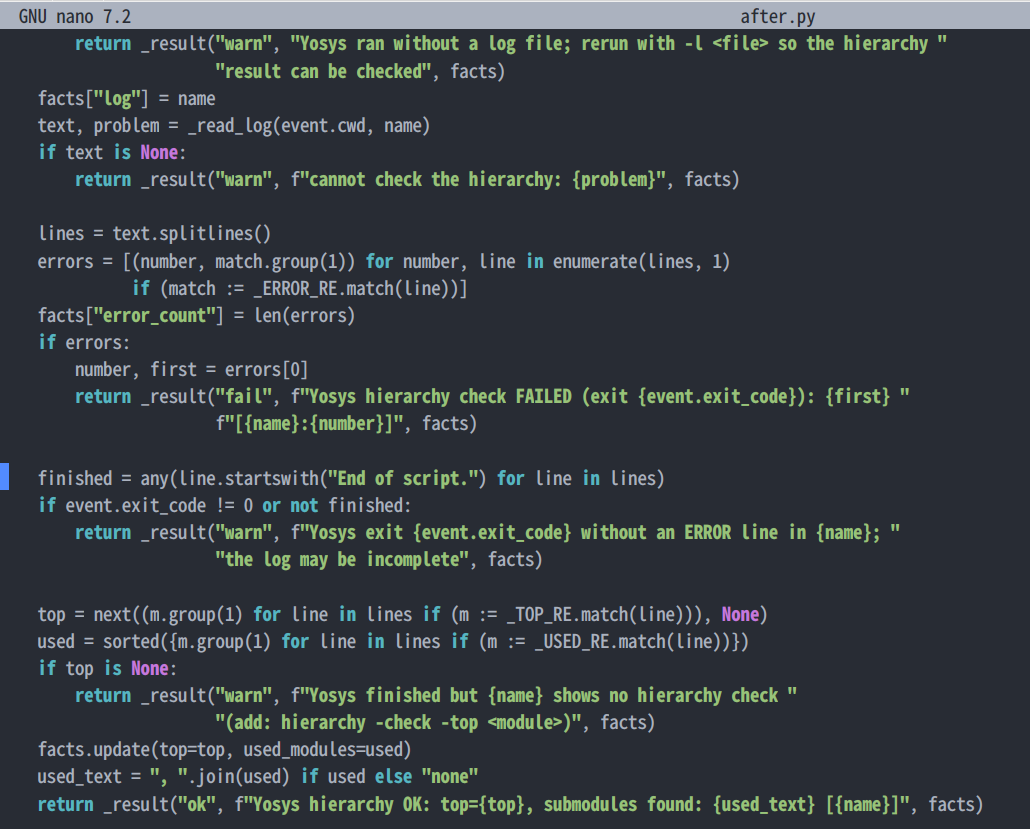
Figure. after.py decision lines (nano -v +97).
Success check. ls package-tests lists seven .yaml files.
4. Validate and run the offline cases
Purpose. Check the Package structure, then run its 7 prepared cases without running Yosys.
Where. Terminux terminal, bash.
terminux-package-validate --root ~/tut03/packages
terminux-package-doctor --root ~/tut03/packages --run-cases --require-cases
Expected (abridged) — terminux-package-validate --root ~/tut03/packages:
Package Contract Validator v1 — 1 package(s) scanned, 0 error(s), 0 warning(s)
VALID
Expected (abridged) — terminux-package-doctor --root ~/tut03/packages --run-cases --require-cases:
PASS yosys_hier_check [7 cases, 7 passed]

1 packages: 1 valid, 0 invalid
7 cases: 7 passed, 0 failed
0 warnings
- Optional, one case on its own. This case expects
failfor a real Yosys "missing module" log, so PASS means the Package reacted correctly:
terminux-package-test --root ~/tut03/packages --package yosys_hier_check --case ~/tut03/packages/yosys_hier_check/package-tests/missing_module_fails.yaml
Expected (abridged) — terminux-package-test --root ~/tut03/packages --package yosys_hier_check --case ~/tut03/packages/yosys_hier_check/package-tests/missing_module_fails.yaml:
PASS yosys_hier_check::missing_module_fails
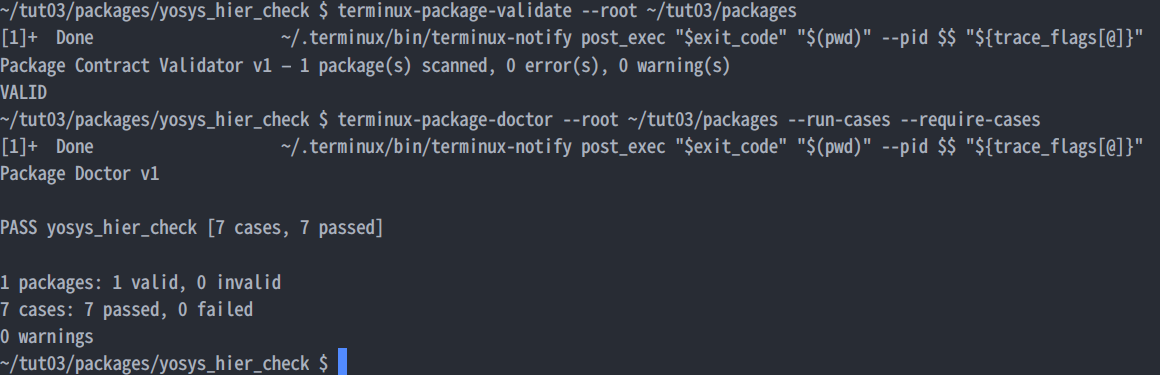
Figure. Validate and offline cases: 7 passed.
Success check. VALID, then 7 cases: 7 passed, 0 failed. Offline PASS is not a Yosys PASS.
5. Install and activate
Purpose. Copy a snapshot of the Package into Terminux and ask the running daemon to load it.
Where. Terminux terminal, bash.
terminux-package-install ~/tut03/packages/yosys_hier_check
terminux-package-status --activate
Expected (abridged) — terminux-package-install ~/tut03/packages/yosys_hier_check:
Installed user package yosys_hier_check 0.1.0
  ...
WARNING: This Package runs Python under your account in the Terminux daemon; it is not sandboxed. Validation checks Package structure, not whether the code is safe. Install only code you trust.
Not active yet: run `terminux-package-status --activate` to load it into the running daemon.
Expected (abridged) — terminux-package-status --activate:
Activation: ACTIVATED
yosys_hier_check 0.1.0
  INSTALLED  yes  ...
  VALID      yes
  LOADED     yes  ...
  STATE      LOADED
  TOOL       yosys origin=user TOOL_REGISTERED yes
  WRAPPER    yosys: WRAPPER_READY (wrapper first on PATH; real executable .../yosys)
  DISPATCH_READY yes (configuration only; not a live run)
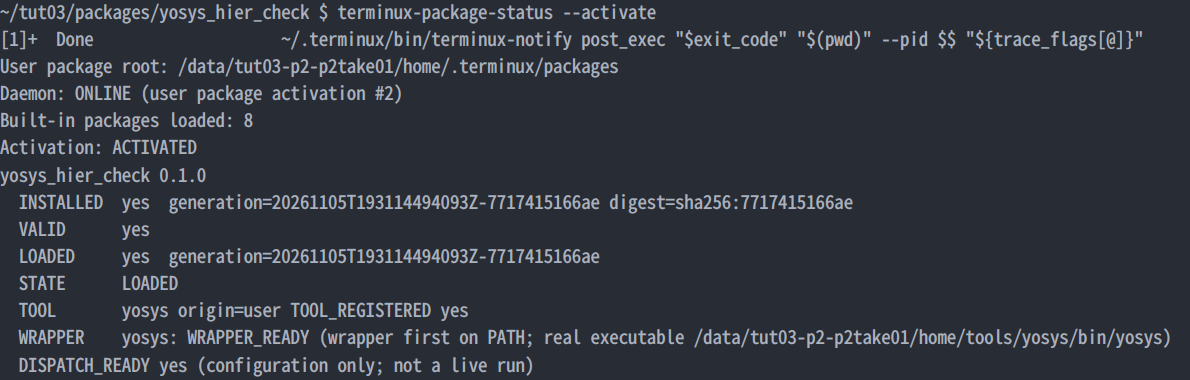
Figure. Activation: LOADED, WRAPPER_READY, DISPATCH_READY.
Success check. LOADED yes, TOOL_REGISTERED yes, WRAPPER_READY, DISPATCH_READY yes. DISPATCH_READY means the configuration is ready; the next section proves a live run. If you change after.py later, install again with --replace, then activate.
6. Run Yosys as usual
Purpose. Run the hierarchy check exactly as you normally would and read the Package result.
Where. Terminux terminal, bash, in ~/tut03/rtl.
cd ~/tut03/rtl
cat hier_check.ys
yosys -s hier_check.ys -l hier_check.log
echo "exit code: $?"
Expected (abridged) — cat hier_check.ys:
# Hierarchy preflight: read every RTL file, then check that all instantiated modules exist.
read_verilog top.v
read_verilog adder.v
hierarchy -check -top top
Expected (abridged) — yosys -s hier_check.ys -l hier_check.log:
3.2. Analyzing design hierarchy..
Top module:  \top
Used module:     \adder
Removed 0 unused modules.
Expected (abridged) — echo "exit code: $?":
exit code: 0
The line below is not printed by Yosys. Within about two seconds the Terminux NotificationBar at the top of the window shows the Package result for this run:
[Package yosys_hier_check] Yosys hierarchy OK: top=top, submodules found: adder [hier_check.log]
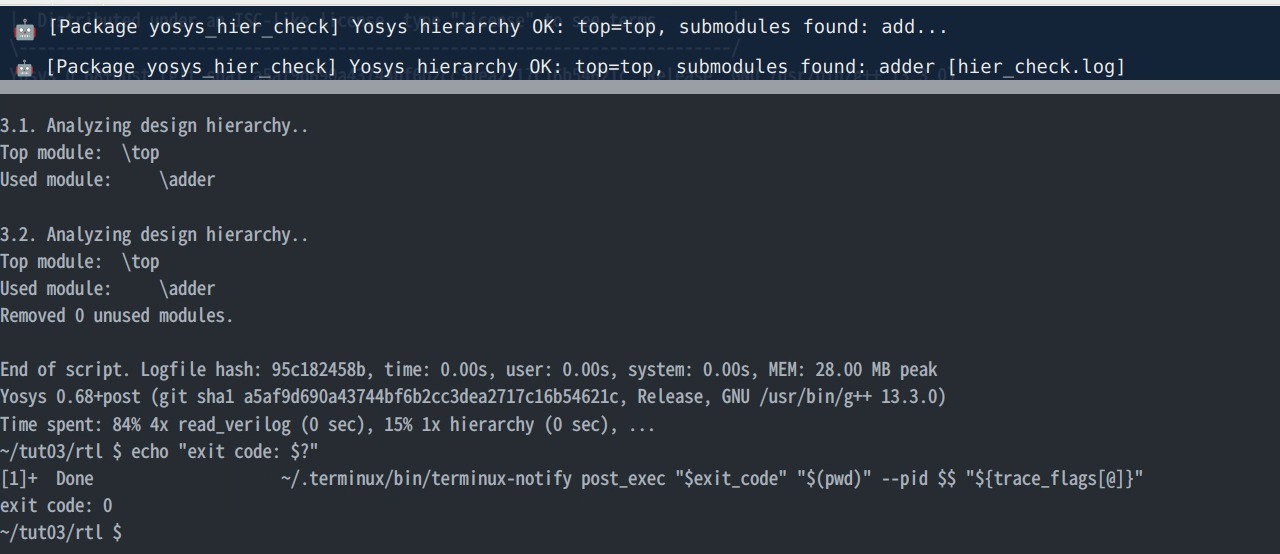
Figure. Top: the NotificationBar, newest entry OK. Bottom: the end of the Yosys output and exit code: 0. Both from the same moment.
Success check. exit code: 0 (bash; in tcsh, echo $status gives the same value but was not tested here). The bar keeps earlier results as history; the newest result is the last line of its list.
7. Break it, read the result, fix it
Purpose. See how a real tool failure looks, and fix the right thing.
Where. Terminux terminal, bash, in ~/tut03/rtl.
- Open the script, delete the line
read_verilog adder.v(in nano: move to the line, Ctrl+K), save (Ctrl+O, Enter) and exit (Ctrl+X):
nano hier_check.ys
- Run the same command again:
yosys -s hier_check.ys -l hier_check.log
echo "exit code: $?"
Expected (abridged) — yosys -s hier_check.ys -l hier_check.log:
2.1. Analyzing design hierarchy..
Top module:  \top
ERROR: Module `\adder' referenced in module `\top' in cell `\u_adder' is not part of the design.
Expected (abridged) — echo "exit code: $?":
exit code: 1
Yosys stops with the ERROR above and the exit code is 1. Separately, the newest Terminux NotificationBar entry is the Package result for this run; it points to line 20 of the log:
[Package yosys_hier_check] Yosys hierarchy check FAILED (exit 1): Module `\adder' referenced in module `\top' in cell `\u_adder' is not part of the design. [hier_check.log:20]
-
Optional: ask Terminux AI what to check first. The exact question used in the recording:
@@ Yosys reports that module \adder referenced by \top is not part of the design. Is this an RTL input or script problem, or a Terminux Package failure? What should I check first, and how can I verify the fix? -
Read the suggestion and keep only what you can check. The recorded answer said (answers vary by model and session):
This is almost certainly an RTL input / script problem, not a Terminux Package failure.
Check the
read_verilog/read_systemveriloglines in your script.Confirm the reference resolves: run
hierarchy -check -top top. A clean pass with no "not part of the design" message means the reference is resolved.Other parts of the answer are general advice for larger setups (for example
ifdefguards or library files). They do not apply to this two-file example. -
Check the script, as the answer suggests:
cat hier_check.ys
Expected (abridged) — cat hier_check.ys:
# Hierarchy preflight: read every RTL file, then check that all instantiated modules exist.
read_verilog top.v
hierarchy -check -top top
-
The
read_verilog adder.vline is gone.top.vuses the moduleadder, but onlyadder.vdefines it. Without that file,hierarchy -checkfinds a reference to a module that was never read, so Yosys stops withERRORand exit code 1. The Package did its job: it found thatERROR:line (line 20 of the log) and reported it. Change the Yosys script, not the Package. (\adderis how Yosys writes module names.)top.vinstantiatesadder:Extract from
top.v, lines 7–11 (not the complete file).adder u_adder ( .a (a), .b (b), .sum(sum) );Only
adder.vdefines it:Extract from
adder.v, line 2 (not the complete file).module adder ( -
Put
read_verilog adder.vback (it goes beforehierarchy -check -top top), save, and run the command again. This is the check the answer suggested: the hierarchy check passes and there is no "not part of the design" message.
nano hier_check.ys
yosys -s hier_check.ys -l hier_check.log
echo "exit code: $?"
Expected (abridged) — yosys -s hier_check.ys -l hier_check.log:
3.2. Analyzing design hierarchy..
Top module:  \top
Used module:     \adder
Removed 0 unused modules.
Expected (abridged) — echo "exit code: $?":
exit code: 0
NotificationBar, newest entry:
[Package yosys_hier_check] Yosys hierarchy OK: top=top, submodules found: adder [hier_check.log]

Figure. Top: the newest NotificationBar entry, FAILED (exit 1) with [hier_check.log:20]. Bottom: the Yosys ERROR and exit code: 1. Both from the same moment.
Success check. Run 2: Yosys ERROR, exit code: 1, newest notification FAILED … [hier_check.log:20]. Run 3: Yosys hierarchy lines without ERROR, exit code: 0, newest notification Yosys hierarchy OK. If you asked AI, you confirmed its suggestion in the script yourself.
8. Clean up (optional)
Purpose. Remove the Package and the tool registration. Afterwards yosys runs directly, without the wrapper. This section is in the Guide only; the video does not show it.
Where. Terminux terminal, bash.
terminux-package-uninstall yosys_hier_check
terminux-tool unregister yosys
terminux-package-status --activate
Success check. No Package result appears after the next Yosys run.
9. Adapting the pattern to Genus or Design Compiler
Purpose. Reuse the development process, not the Yosys code. Nothing in this section was run: there is no Genus or DC Package and no commercial-tool capture in this tutorial.
Where. Your own tool environment, following sections 2–6.
-
Know which parts of this Package carry over: the structure and the development method, not the Yosys-specific command flags, parser patterns or exit-code meaning. Line numbers refer to
after.py:Part In this Package For another tool Manifest layout, api,phases.after: after.runpackage.yamlKeep when.tools[yosys]Change to the executable name you registered run(ctx)entry, wrapper-only check, returningPhaseResultlines 73–77 Keep Safe log reading (inside the working folder, regular file, size limit) _read_log, lines 41–60Reusable approach, provided that the tool's log is a regular file under the working directory and within the supported size; otherwise adapt evidence discovery and reading for that tool Result and notification helper _result, lines 63–70Keep How the log file is named on the command line _LOG_FLAGS(line 24),_log_name(lines 30–38)Adapt: from your tool's documented options Failure and success markers ERROR:,Top module:,Used module:(lines 25–27),End of script.(line 97)Adapt: from your tool's real logs Meaning of the exit code non-zero without ERROR:→warn(lines 97–100)Adapt: check your tool's documented exit codes Offline cases 7 cases built from real Yosys logs Rebuild from your tool's real logs This table gives no Genus or Design Compiler commands, options or log text: none were tested in this tutorial. Take them from your tool's documentation and from real logs on your system.
-
Register the tool's executable name (section 2). Check that it is not a built-in Terminux tool name.
-
Decide which evidence the handler reads: a log file named on the command line, a report directory, or the exit code. Each tool writes different markers; write the parser for that tool.
-
Write offline cases from real logs of that tool (success, the failures you care about, missing or incomplete logs), then validate and run them (section 4).
-
Install, activate and confirm with one real run in the Terminux terminal (sections 5–6).
Success check. The same checks as for Yosys: VALID, all offline cases pass, DISPATCH_READY yes, and one correct result line after a real run.
Troubleshooting
| You see | Meaning / fix |
|---|---|
| No notification after Yosys | Run Yosys inside the Terminux GUI terminal and check that terminux-package-status shows DISPATCH_READY yes. |
warn … without a log file |
Add -l hier_check.log to the command. |
warn … outside the working directory |
Write the log in the folder where you run Yosys. |
DISPATCH_READY no (TOOL_REGISTRATION_PENDING_ACTIVATION:…) |
Run terminux-package-status --activate. |
WRAPPER_NOT_FIRST_ON_PATH, REAL_EXECUTABLE_NOT_FOUND |
~/.terminux/bin must come before Yosys on your PATH, and Yosys must be installed. |
USER_TOOL_USED_BY_BUILTIN_PACKAGE / USER_TOOL_SHADOWS_BUILTIN at register |
The name belongs to Terminux; use another tool name. |
USER_TOOL_EXECUTABLE_PATH_OCCUPIED |
A file named yosys already exists in ~/.terminux/bin; Terminux will not overwrite it. |
Lines like [1]+ Done … terminux-notify post_exec … after commands |
Harmless. Terminux's bash integration sends a background notice after each command and bash reports that the job finished. Known cosmetic issue. |
| Command not found right after registering (tcsh) | Run rehash once. (Not tested in the Terminux GUI.) |
Limits
- File names and arguments must not contain spaces or quotes.
- The Package reads the log file named after
-l, not the terminal output. - Your Package is Python that runs under your account in the Terminux daemon, with no sandbox. Install only code you trust.
- Offline cases passing (
7 cases: 7 passed) means the Package reacts correctly to those prepared logs. It does not mean your RTL is fine, and it is not a live run.
Tutorial files and license
Tutorial files (top.v, adder.v, hier_check.ys, the yosys_hier_check Package and its 7 cases) were written for this tutorial. Their distribution license is not decided; until it is decided, use them only to follow this tutorial. The icc2_shell_dqe example is part of the Terminux product and is marked FAKE (it was written against a fake tool, not real IC Compiler II).