Installation and Deployment
Verify the archive SHA256 against an independently trusted reference before installation. On a mismatch or without a trusted reference, STOP: do not extract or run the installer.
Audience: the PM (project manager), IT administrators, and engineers who are installing the evaluation build themselves. For how to use isvn after installation, see the isvn User Guide.
0. Choose an installation method first
| Method A: project installer | Method B: Portable evaluation build | |
|---|---|---|
| Who installs it | The PM, once; members share it | Each person, in their own home directory |
| Where it is installed | The project directory chosen by the PM (<install dir>/bin) |
~/.local/opt/isvn/<version> |
| Subversion | Uses the svn already installed on the system |
The package ships its own svn, svnadmin and svnmucc |
| Qt (needed by the GUI) | Not included; you specify the Qt path at install time | Not included; it is linked to an existing Qt at install time |
| Initializes a project? | Yes (runs isvn admin init) |
No; it only installs the programs |
| Purpose | The team's real project | Evaluation, tutorials and demo projects |
Neither method needs root or sudo, and neither writes to system paths.
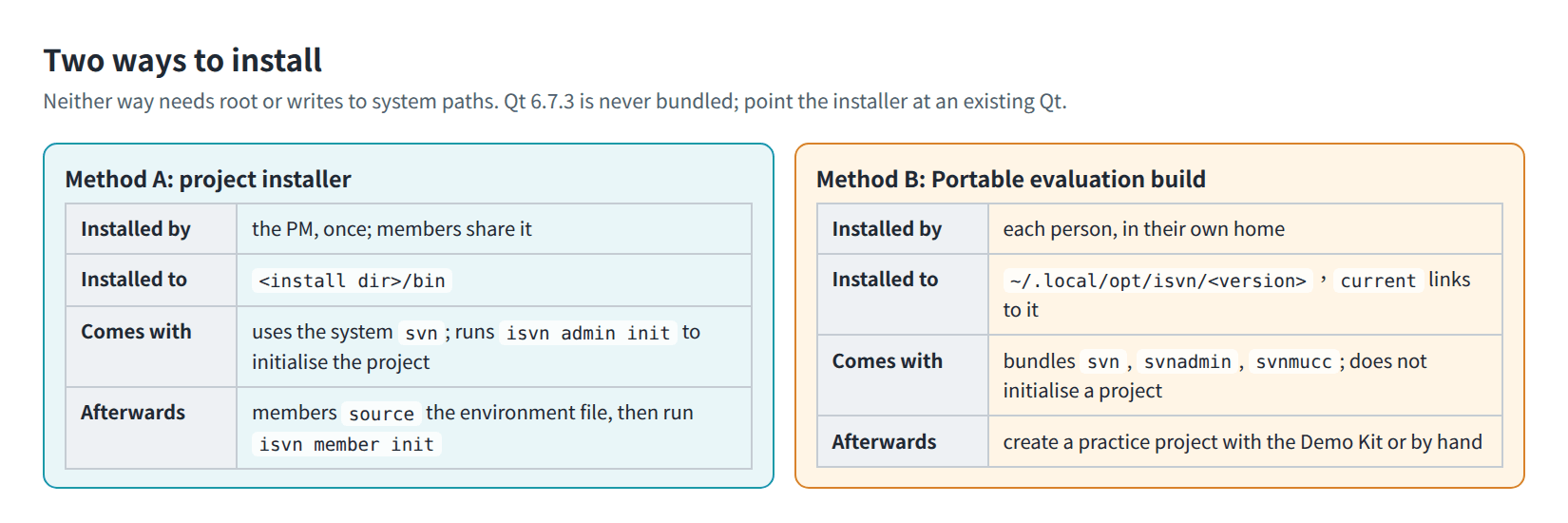
Figure I-01. The two installation methods compared.
1. System overview
isvn stores the content of every version in SVN and, on top of that, provides version lineage, a deduplicating cache pool (the pool), and link-based workspaces. A deployment has three locations that can be placed separately, plus each member's own workspace:
| Location | Contents | Size | Recommendation |
|---|---|---|---|
| SVN repository | The content of every version, accessed through file:// |
Large | Mounted and expanded separately by IT |
| Pool | The deduplicated content of working files | Large | Mounted and expanded separately by IT |
| Project directory | Shared configuration and the lineage database (with Method A, the programs too) | Small | Under the PM's home directory is fine |
| Member workspaces | The versions each member has checked out | Depends on the workload | Managed by each member |
- The three locations are independent of each other; they do not have to be under the same directory tree.
- The capacity of the pool is determined by the mounted storage; isvn has no "set capacity" feature, and expanding capacity means adding storage.
tmp/andobjects/in the pool must be on the same file system (writes use an atomic move). Putting the whole pool directory on one mount point is enough.
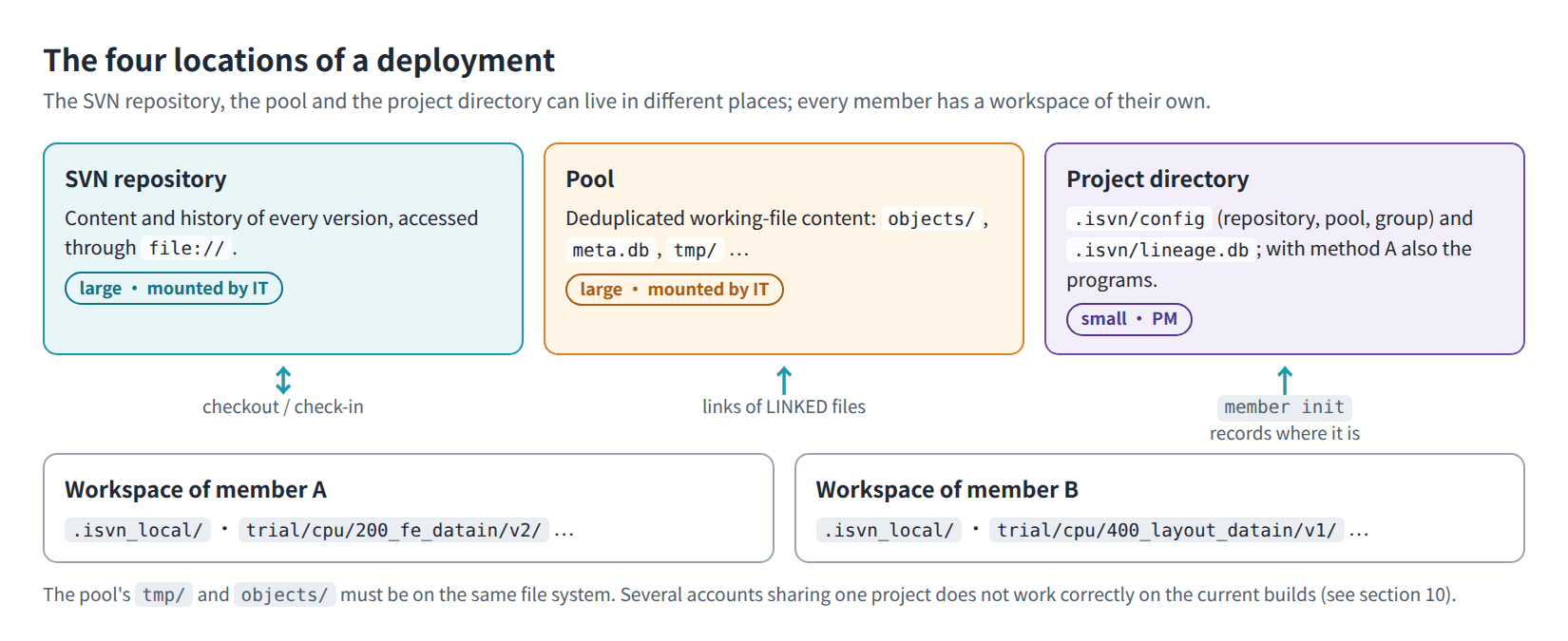
Figure I-03. The four locations of a deployment and how they relate.
2. System requirements
| Item | Requirement |
|---|---|
| Operating system | Linux x86_64. The Portable evaluation build needs glibc 2.34 or later; the target platforms are Ubuntu 24.04 and Rocky Linux 9 |
| Subversion | Method A: the system must have the svn client, plus svnadmin for creating the repository. Method B: not needed; the package ships its own |
| Qt | Needed only by the GUI: Qt 6.7.3 (gcc_64). Qt is not included; it can be installed anywhere, but the install path and the lib/, plugins/ and qml/ inside it must not be writable by group or others |
| Graphical environment | The GUI needs an X11 desktop environment and the system libraries required by Qt's xcb platform plugin |
| SQLite | No separate installation needed; it is built into the programs |
| Project group | One Linux group (for example prj_myproject); the PM and all members must belong to it |
| Permissions | The PM must be able to create directories, set group permissions and create the SVN repository; root is not needed |
| Other | python3 is used only by the TUT01 Demo Kit |
3. Method A: project installer
3.1 Installer contents
isvn-installer/
  install.sh                  install script (run by the PM)
  README.md
  bin/
    isvn                      CLI
    isvn-gui                  GUI launcher (optional)
    libexec/isvn-gui          GUI main program (optional)
    libexec/isvn-gui.qt-version   Qt version the GUI was built with
The contents of bin/ come from the install tree of a Release build (cmake --install <build> --prefix <staging dir>).
Check before delivery:
isvn-installer/bin/isvnin the source repository is only a placeholder used for testing the flow, and no GUI comes with it. When you build the installer, replace it with the CLI and GUI that were actually built.
3.2 Before you install
-
Create the project group and add the PM and all members to it.
-
Create the SVN repository (the install script does not create it for you):
svnadmin create /data/svnrepos/myproject chgrp -R prj_myproject /data/svnrepos/myproject chmod -R g+rwX /data/svnrepos/myproject -
If you are going to use the GUI, install Qt 6.7.3 first.
3.3 Run the installation
Interactive: follow the prompts to enter the install directory, repository, pool and group; when the installer includes the GUI, also enter the Qt path:
cd isvn-installer
./install.sh
Non-interactive:
./install.sh \
  --project-dir "$HOME/isvn/myproject" \
  --repo        file:///data/svnrepos/myproject \
  --pool        /cache/isvn_pool/myproject \
  --group       prj_myproject \
  --qt-prefix   /opt/Qt/6.7.3/gcc_64 \
  --yes
| Parameter | Description |
|---|---|
--project-dir |
The install directory, which is also the project directory (ISVN_PROJECT_DIR). The programs and the environment files are installed here |
--repo |
The file:// URL of the SVN repository; it must already exist and svn list must work on it |
--pool |
The root directory of the pool |
--group |
The name of the project's Linux group; it must already exist |
--qt-prefix |
The Qt path used by the GUI. When it is omitted, the install script searches, in order, the environment variable ISVN_QT_PREFIX, qtpaths/qmake on PATH, CMAKE_PREFIX_PATH and common locations, and uses the first one it finds as the default |
--yes |
Do not ask for confirmation item by item |
3.4 What the install script does
- Checks that
svn, the group and the repository are usable. - Copies the CLI to
<install dir>/bin/isvn. When the installer includes the GUI:- installs
bin/isvn-guiandbin/libexec/isvn-gui; - after checking the version and permissions of Qt, creates
bin/qtas a link to the Qt path.
- installs
- Generates
<install dir>/isvn.cshrcand<install dir>/isvn.bashrcfor members tosource. - Runs
isvn admin init(see 3.5). This is skipped when the project has already been initialized. - Prints the commands to give to the members.
Always start the GUI with isvn-gui; it finds Qt through bin/qt, so there is no need to set LD_LIBRARY_PATH.
3.5 What admin init does
isvn admin init \
  --project-dir "$HOME/isvn/myproject" \
  --repo        file:///data/svnrepos/myproject \
  --pool        /cache/isvn_pool/myproject \
  --group       prj_myproject
- Creates the project directory and the
.isvn/inside it. - Creates the lineage database
.isvn/lineage.dband records the top-levelROOTnode. - Creates the pool structure:
objects/,meta.db,locks/,tmp/,backup/. - Creates
branches/in the repository when it does not exist yet. - Writes
.isvn/config(repository, pool, group). - Sets the group and permissions of the directories and files above explicitly, without relying on umask (see section 8 for the values).
On success it prints initialized isvn project at <project dir>.
Running it again is safe: when a ROOT record already exists it is not recorded a second time, and only the integrity of the lineage is checked. For what a re-run changes, see section 10. The account that runs admin init is the PM of this project.
3.6 Update the programs or change Qt
- Project installer: Run
install.shagain from the new installer with the same parameters.admin initis skipped for a project that is already initialized. To change Qt, just change--qt-prefix. - Environments managed with release slots (Production): Do not overwrite the programs by rerunning the install script; deploy as described in section 9.
4. Method B: Portable evaluation build
The Portable package shares one copy of Qt with Terminux; the package itself does not contain Qt.
4.1 Install
tar -xzf isvn-<version>-linux-x86_64.tar.gz
cd isvn-<version>-linux-x86_64
./install.sh --qt-dir /opt/Qt/6.7.3/gcc_64 --yes
--qt-diris the root directory of Qt 6.7.3 gcc_64 (the directory that containslib/libQt6Core.so.6). When it is omitted, the install script tries to reuse the Qt that Terminux uses.- It installs to
~/.local/opt/isvn/<version>and creates~/.local/opt/isvn/currentpointing to it. - The install script first verifies the files in the package (
Package SHA256SUMS: OK), then checks Qt and the system libraries. The new version is set ascurrentonly after the Qt check passes. - When a check fails, it lists
[FAIL]and the names of the missing libraries, and installs nothing. - When the same version is already installed, it reports
already installed. - The install script does not modify
PATH.
Actual output (a fresh account on Ubuntu 24.04, with Qt mounted at /opt/qt673):
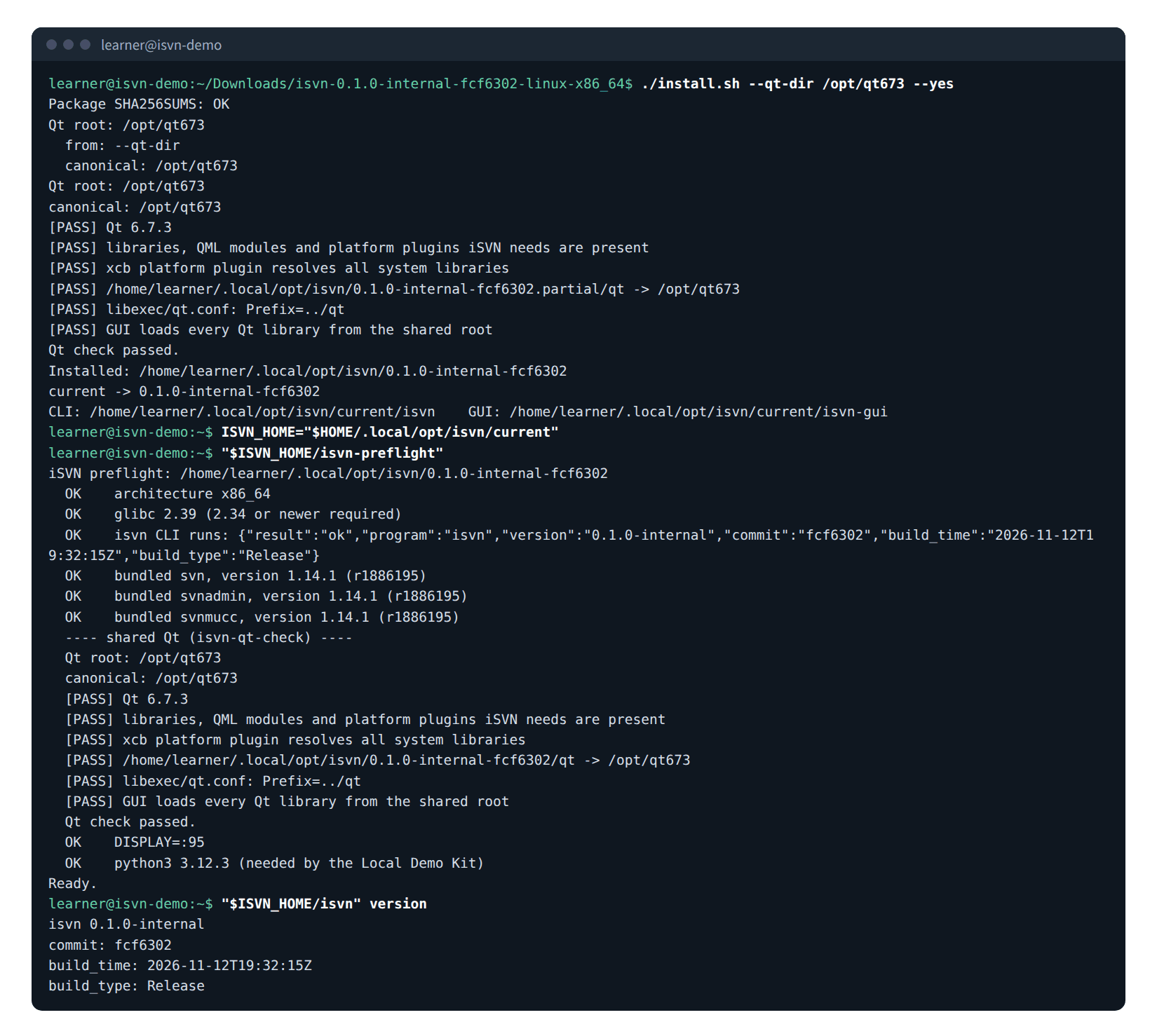
Figure I-02. Real output of the Portable installation, isvn-preflight and isvn version.
4.2 Check
ISVN_HOME="$HOME/.local/opt/isvn/current"
"$ISVN_HOME/isvn-preflight"
"$ISVN_HOME/isvn" version
The installation is complete only when Ready. is the last line of the isvn-preflight output. WARN no DISPLAY only means that this terminal has no graphical environment; the CLI can still be used.
4.3 Use
- Always start the programs through
current/isvn,current/isvn-guiand the tools undercurrent/svn/bin/. Runninglibexec/isvndirectly bypasses the Subversion shipped in the package. - The GUI uses only the
isvnin the same install directory. - The Portable evaluation build installs the programs only. There are two ways to get a project to work with:
-
create a demo project with the TUT01 Demo Kit (see the TUT01 Guide);
-
create a practice project and workspace yourself:
ISVN_HOME="$HOME/.local/opt/isvn/current" mkdir -p "$HOME/isvn_trial" "$ISVN_HOME/svn/bin/svnadmin" create "$HOME/isvn_trial/svnrepo" "$ISVN_HOME/isvn" admin init \ --project-dir "$HOME/isvn_trial/project" \ --repo "file://$HOME/isvn_trial/svnrepo" \ --pool "$HOME/isvn_trial/pool" \ --group "$(id -gn)" "$ISVN_HOME/isvn" member init \ --project-dir "$HOME/isvn_trial/project" \ --workspace "$HOME/isvn_trial/work"$HOME/isvn_trialmust be a directory name that does not exist yet. When this is done, create the first version as described in section 6.
-
Figure I-04 shows the result of actually running the same steps (to keep the commands shorter, current and current/svn/bin are added to PATH first); at the end it lists the directories and permissions created by admin init:
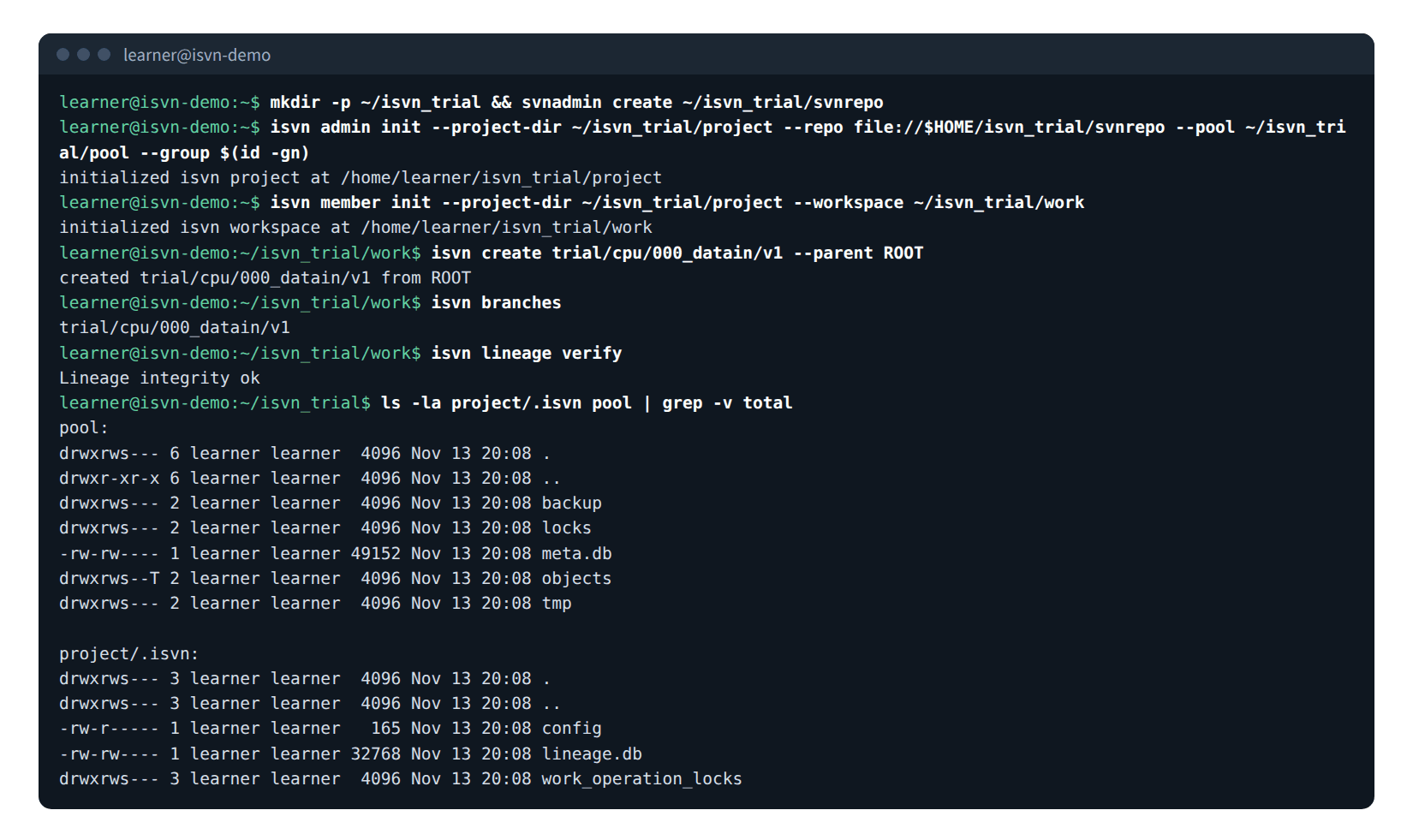
Figure I-04. Real output of creating a practice project, a workspace and the first version from scratch, with the permissions set by admin init.
5. Members joining the project
Several accounts can use the same project, each in its own workspace. Each member joins by following the steps below.
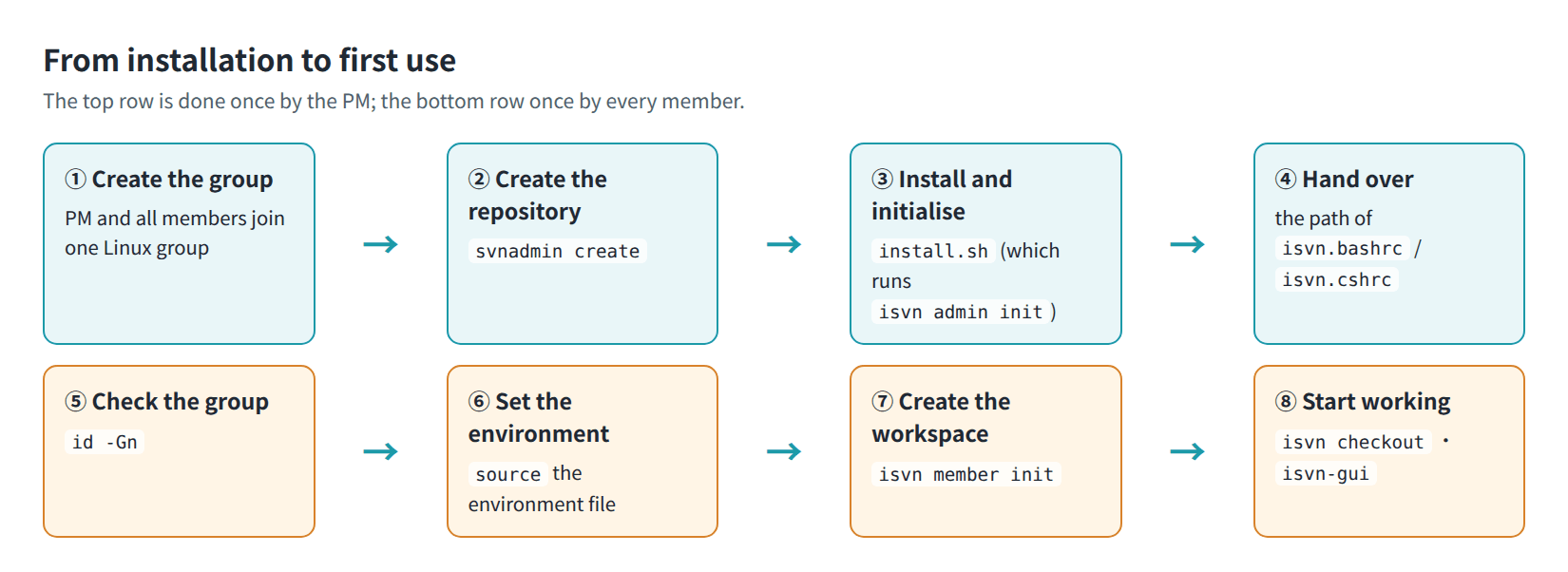
Figure I-05. From installation to first use: once by the PM (top row), once by every member (bottom row).
5.1 Check the group
id -Gn # the output must include the project group
An account that has just been added to the group must log in again before the change takes effect.
5.2 Set up the environment (Method A)
source the environment file provided by the PM that matches your shell; writing the command into ~/.cshrc or ~/.bashrc is recommended:
source <install dir>/isvn.cshrc   # tcsh/csh
source <install dir>/isvn.bashrc  # bash/sh
The environment file does only two things: it adds <install dir>/bin to PATH, and it sets ISVN_PROJECT_DIR. The locations of the repository and the pool come from .isvn/config; members do not need to set them.
5.3 Create the workspace
Each member runs this once:
isvn member init \
  --project-dir <project dir> \
  --workspace   "$HOME/work/myproject"
member init does the following:
- reads the project's
.isvn/config; - confirms that the current account belongs to the project group, and refuses otherwise;
- confirms that the pool is usable (
objects/,locks/andmeta.dball exist); - confirms that the repository can be reached;
- creates the workspace directory and
.isvn_local/, and records the location of the project directory.
On success it prints initialized isvn workspace at <workspace>.
The workspace root itself is not an SVN working copy; each version you check out afterwards goes into its own <workspace>/<phase>/<block>/<stage>/<version>/.
5.4 Get started
cd "$HOME/work/myproject"
isvn branches                               # list the versions in the repository
isvn checkout trial/cpu/200_fe_datain/v2    # check out one version
isvn-gui                                    # open the GUI
The GUI shows the Work page the first time it opens; when no version has been checked out yet, the screen looks like Figure U-06 (isvn User Guide, section 3.1).

Figure U-06. The GUI on first start: the Work page with no version in the workspace yet.
6. Create the first version
A newly created repository has no versions, and the output of isvn branches is empty. For the first version you must state explicitly that it has no upstream:
cd <workspace>
isvn create trial/cpu/000_datain/v1 --parent ROOT
When it finishes it prints created trial/cpu/000_datain/v1 from ROOT, and the working copy of the new version is at <workspace>/trial/cpu/000_datain/v1/.
After you put the design files into this directory, commit them with batch check-in in the GUI or with isvn checkin-batch (see sections 9 and 19.1 of the isvn User Guide). Taking two files, top.v and constraints.sdc, as an example:
V=trial/cpu/000_datain/v1
plan_of() { python3 -c 'import json,sys; print(json.load(sys.stdin)["plan_hash"])'; }
plan=$(isvn checkin-batch preview $V --path top.v --path constraints.sdc --json | plan_of)
isvn checkin-batch apply $V --path top.v --path constraints.sdc --expected-plan "$plan" --message "initial design input" --json
"status":"committed" and revision in the output mean that the commit succeeded.
A single file or a whole folder can also be committed with isvn checkin <path> (see the isvn User Guide, section 19.2).
7. GC scheduling
GC is run from cron by the PM's account. Only the PM (the owner of the project's .isvn) can run isvn gc; other accounts are refused.
# hourly: remove stale link records and correct the reference counts (does not reclaim space)
0 * * * *  ISVN_PROJECT_DIR=/home/pm/isvn/myproject /home/pm/isvn/myproject/bin/isvn gc --reconcile

# daily: when usage exceeds 90%, reclaim space until it is below 70%
0 3 * * *  ISVN_PROJECT_DIR=/home/pm/isvn/myproject /home/pm/isvn/myproject/bin/isvn gc --reclaim --high 0.9 --low 0.7
- cron does not carry over your usual environment, so write the full path of
isvnand setISVN_PROJECT_DIR. The paths above are examples; replace them with the actual install directory. - Before scheduling it for the first time, run
isvn gc --reconcile --dry-runby hand to see what it would remove; it does not delete anything. - Reclaiming first deletes content that has no references at all. Only when that is still not enough does forced eviction remove the least recently used content; this means that the amount of data being worked on is close to the capacity of the pool, and it is a signal that the storage should be expanded. Use
isvn pool-stat --evict-eventsto watch how often forced eviction happens.
SVN authz (optional): isvn does not manage SVN's path-based authz. If the team needs to divide read and write permissions by stage, configure that directly in SVN.
8. Directory layout and permissions
The permission values below are the modes that the install script and isvn create.
8.1 Project directory
<project dir>/                   2770
  bin/                           Method A only: isvn, isvn-gui, libexec/, qt
  isvn.cshrc, isvn.bashrc        Method A only: environment files for members (0644)
  .isvn/                         2770
    config                       0640   repository, pool, group
    lineage.db                   0660   lineage database
8.2 SVN repository
/data/svnrepos/myproject/
  branches/                      each version corresponds to branches/<phase>/<block>/<stage>/<version>
8.3 Pool
/cache/isvn_pool/myproject/      2770
  objects/                       3770
    <first two hash chars>/      3770
      <hash>                     0440   content object, read-only
  meta.db                        0660   records of objects and links
  locks/                         2770
  tmp/                           2770   temporary area for writes (must be on the same file system as objects/)
  backup/                        2770
8.4 Member workspace
<workspace>/                     0750
  .isvn_local/                   0700   private state of the workspace; do not edit by hand
    config                       0600   location of the project directory
    workspaces                   0600   list of checked-out versions
    workspace_state              0600   records of LOCAL files
    editable_receipts/                  Make Editable receipts (present only after use)
    work_operations/                    records of operations in progress (present only after use)
  <phase>/<block>/<stage>/<version>/    working copy of each version
8.5 Permission principles
- The shared locations (project directory, pool) are all controlled through the project group plus explicit permissions, without relying on umask.
- The content objects in the pool are read-only so that they are not modified by mistake; to modify a file you must use Make Editable on it first.
lineage.dbis group-writable. The trustworthiness of the lineage does not rest on the file being read-only; it rests on append-only records, the account stored with each record, and the integrity check (isvn lineage verify).- The lineage database and the pool's
meta.dbare two separate files and must not be used interchangeably.
9. Production deployment and rollback (for maintainers)
The Production programs are not overwritten with the install script; they are managed with release slots:
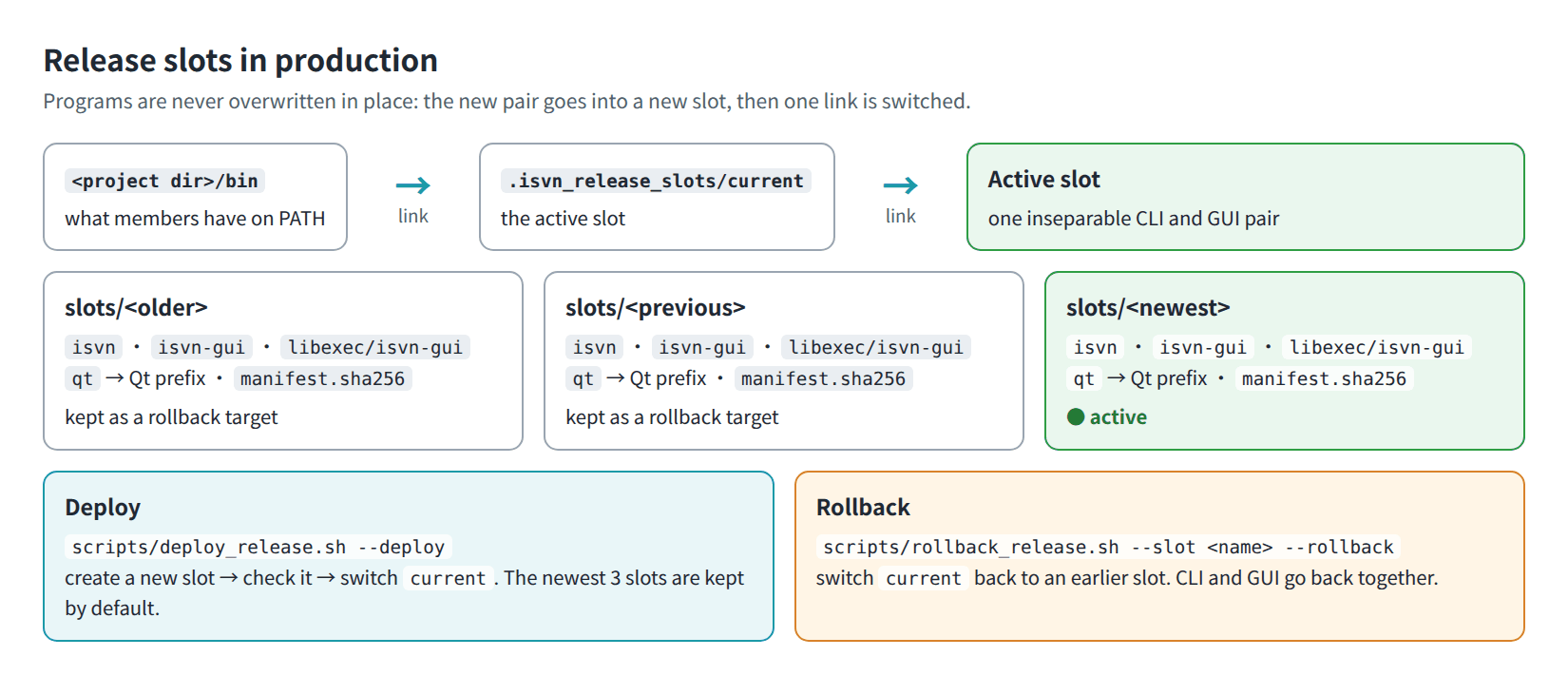
Figure I-06. Release slots in production: deploying and rolling back both switch a link.
<project dir>/binis a link that points, through<project dir>/.isvn_release_slots/current, to the currently active slot (.isvn_release_slots/slots/<name>/). Each slot is one inseparable set of CLI and GUI, plus a file list and hashes (manifest.sha256,manifest.links).- Deployment first puts the new set into a new slot and then switches the link in one step; rollback switches back to an earlier slot.
- Each slot carries its own
qtlink, which points to the Qt path specified at deployment time. - By default the newest 3 slots are kept as rollback targets.
# the source is the install tree of a Release build
cmake --install build-release --prefix build-release/stage

scripts/deploy_release.sh --dry-run                                   # rehearse first
scripts/deploy_release.sh --deploy [--qt-prefix /opt/Qt/6.7.3/gcc_64] # then deploy

scripts/rollback_release.sh --slot <slot name> --dry-run
scripts/rollback_release.sh --slot <slot name> --rollback

scripts/check_production_identity.sh                                  # verify the version and hashes of production
Rules:
- Do not overwrite the production
isvnorisvn-guione by one withcp. - The CLI and the GUI are always deployed as a pair and rolled back as a pair.
- When
--qt-prefixis omitted, the Qt path of the current slot is reused. - Record every deployment and rollback in
docs/deployment/DEPLOYMENT_LOG.md, and updatedocs/deployment/production_identity.env.
For the detailed steps, see docs/deployment/ROLLBACK_SOP.md and docs/deployment/PRODUCTION_IDENTITY_GUARD.md in the source repository.
10. Notes
-
Re-running
isvn admin init: Running it again with the same arguments is safe: it does not touch repository content, lineage records, pool content or members' workspaces. It does three things:- It sets the group of the project directory,
.isvnand the pool root to--groupand their mode back to2770. If you changed the mode of those three directories yourself (for example, added the sticky bit), change it again afterwards. - It rewrites
.isvn/configfrom the--repo,--pooland--groupgiven this time. Anything added to that file by hand is not kept. - It creates
branches/in the repository if it is missing.
Do not re-run it with a different
--repoor--pool: the project would then point at another repository or pool, and existing workspaces are not moved. - It sets the group of the project directory,
-
Permissions of the Qt path: If the Qt install path is writable by group or others, both the install script and the deployment script refuse it.
11. Verify the installation
11.1 PM
isvn version                 # confirm the build
isvn lineage verify          # should print Lineage integrity ok
isvn pool-stat               # new project: objects=0, refs=0
isvn admin status --json     # space and permission summary of the three locations
11.2 Members
cd <workspace>
isvn workspaces              # the first line is the project name; no other output when no version is checked out yet
isvn branches                # versions in the repository; empty for a new project
Running isvn status in the workspace root tells you to enter a version's directory first; this is normal.
12. Troubleshooting
| Symptom | Likely cause and what to do |
|---|---|
member init: current user is not in project group |
The account has not been added to the project group. Ask the administrator to add it, log in again, then confirm with id -Gn |
member init: pool is not initialized or not readable |
The pool is not mounted, or the permissions are wrong. Confirm that objects/, locks/ and meta.db all exist and that the group can access them |
isvn: cannot locate project dir; set ISVN_PROJECT_DIR or run from a workspace |
You are not inside a workspace and ISVN_PROJECT_DIR is not set. source the environment file, or enter a workspace |
isvn: not inside an isvn workspace; run isvn member init first |
This command must be run inside a workspace |
| The move fails when writing to the pool | tmp/ and objects/ are not on the same file system. Put the whole pool on one mount point |
isvn gc reports AUTHORIZATION_DENIED |
Only the PM can run GC |
isvn remove <folder> reports svn: E155011 … is out of date |
A file in the folder has been committed again since the folder was checked out. Run isvn update in that version's directory first, then run the command again |
| The pool keeps growing and runs out of space | The amount of data being worked on is larger than the capacity. Watch it with isvn pool-stat --evict-events; if forced eviction keeps occurring, arrange an expansion with IT |
isvn lineage verify reports that the lineage is not intact |
Someone may have bypassed isvn and changed the database directly. Use isvn lineage audit to look at the accounts and times around the break point |
GUI: refusing to start without its own isvn CLI |
The GUI's install directory has no matching isvn. Reinstall the complete set |
| The GUI cannot find the Qt libraries at startup | bin/qt (or qt in the Portable build) does not point to the correct Qt 6.7.3. Method A: reinstall with --qt-prefix. Method B: reinstall with --qt-dir |
install.sh of the Portable build: Qt check failed; nothing was installed |
The Qt path is wrong, or system libraries are missing. Fix what the [FAIL] line reports, then run it again |