Terminux Lineage Query
This document is the command reference for
isvn provenance queryandisvn file query. Every JSON example is the output of an actual run.
1. Positioning
isvn provides two groups of read-only query commands so that external tools such as Terminux can call them as a subprocess and parse the JSON:
isvn provenance query --type parent|ancestor-chain|root|pedigree   # version level
isvn file query       --type versions|parent|root                  # file level
- CLI and JSON only: there is no daemon and no HTTP API.
- Both command groups are read-only; they do not modify versions, files or lineage.
- Lineage is declared by users: neither command group verifies file content or infers lineage from the cache's hash or refcount. Each version has at most one direct upstream; files are matched by exactly identical paths.
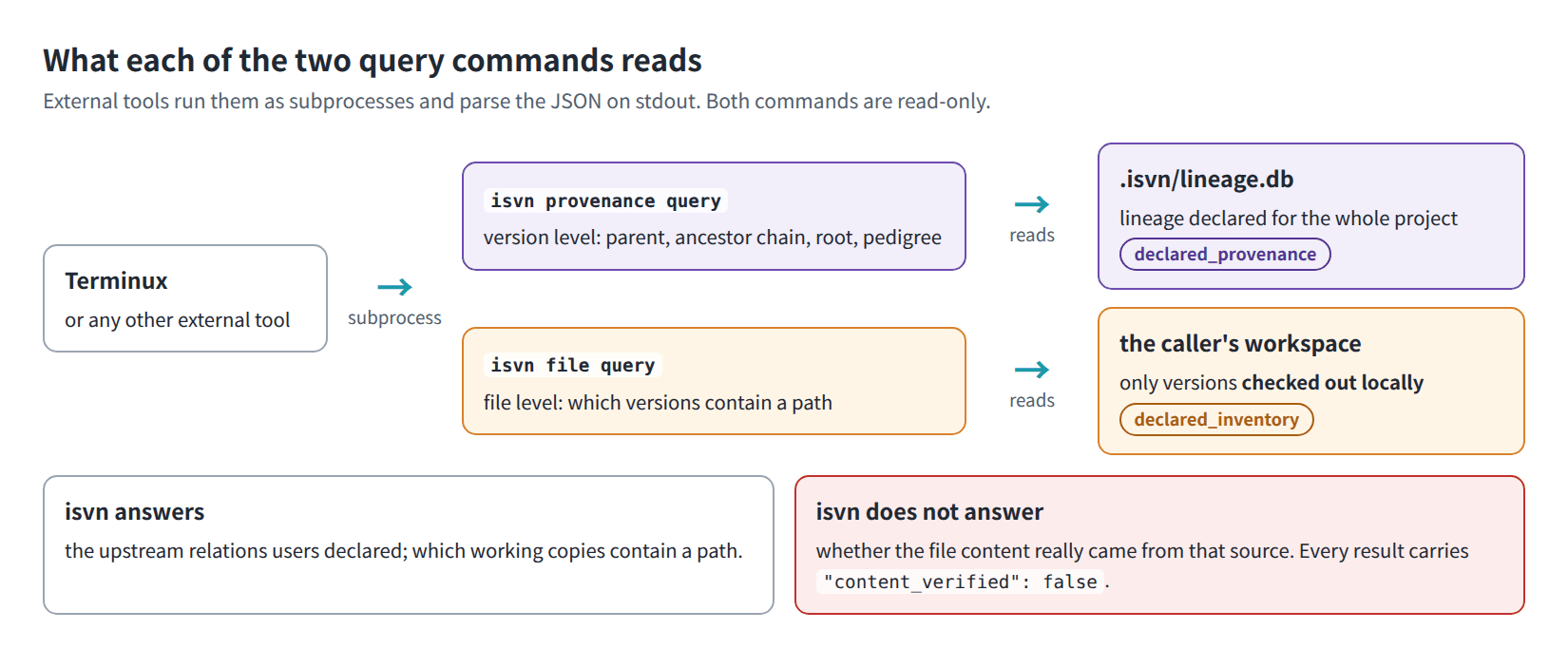
Figure Q-01. What each query command reads, and what isvn does and does not answer.
1.1 Trust model
| System | Authority type | What it answers | What it does not answer |
|---|---|---|---|
| isvn | Declared lineage and inventory (declared provenance / declared inventory) | The upstream relationship the user registered when creating a version; which versions a given path appears in | Whether the file content really comes from that source |
| Terminux | Content fact | The actual output chain shown by the checksum ledger | Replacing isvn's version decisions |
Every query result, whether it succeeds or fails, carries these two fields to remind the caller not to treat it as content fact:
{ "authority": "declared_provenance", "content_verified": false }
{ "authority": "declared_inventory",  "content_verified": false }
1.2 Applicable versions
This document describes the isvn provenance query and isvn file query command groups of the current isvn. isvn version shows the version of isvn in use.
All examples in this document were run on a demo project whose project directory is /proj/demo/project.
2. Command format
isvn provenance query [--project <project dir>] --version <version id> \
     --type parent|ancestor-chain|root|pedigree [--max-depth <N>] --json

isvn file query [--project <project dir>] [--version <version id>] --path <relative path> \
     --type versions|parent|root --json

isvn file locate --path <path> [--project <project dir>] --json
| Argument | Rule |
|---|---|
--json |
Required. If it is omitted, the command ends right away: stderr prints isvn: provenance query requires --json (or file query requires --json), exit code 1 |
--project |
Optional. If it is omitted, the command uses the environment variable ISVN_PROJECT_DIR and then the workspace you are currently in, in that order. If neither is found, stderr prints isvn: cannot locate project dir; set ISVN_PROJECT_DIR or run from a workspace, exit code 1. When an external tool calls the command, passing it explicitly is recommended, so that the result does not depend on the environment |
--version |
Must be the complete four-segment version ID: <phase>/<block>/<stage>/<version>, for example trial/cpu/400_layout_datain/v1. Short names such as v1 are not accepted |
--type |
See sections 3 and 4 |
--max-depth |
Affects only ancestor-chain and pedigree. A positive integer; the default is 20 |
--path |
A path relative to the root directory of the version; it must not be an absolute path and must not contain .. |
file query returns results only when it is run inside a workspace; see section 4.1 for the reason. The --path of file locate may be an absolute path; see section 4.5 for its rules.
2.1 The version object and canonical
Every version in a query result is the same kind of object:
{
  "canonical": "isvn://project/trial/cpu/200_fe_datain/v2",
  "phase": "trial", "block": "cpu", "stage": "200_fe_datain", "version": "v2"
}
- The format of
canonicalisisvn://<project dir name>/<phase>/<block>/<stage>/<version>.- The "project dir name" is the last segment of the project directory path. For example, if the project directory is
/proj/demo/project, the prefix isisvn://project/. - As a result, different projects have the same canonical whenever their directories have the same name. When comparing across projects, the caller has to add its own distinction between projects.
- The "project dir name" is the last segment of the project directory path. For example, if the project directory is
- Use
canonicalto compare version identity;phase/block/stage/versionare for display only.
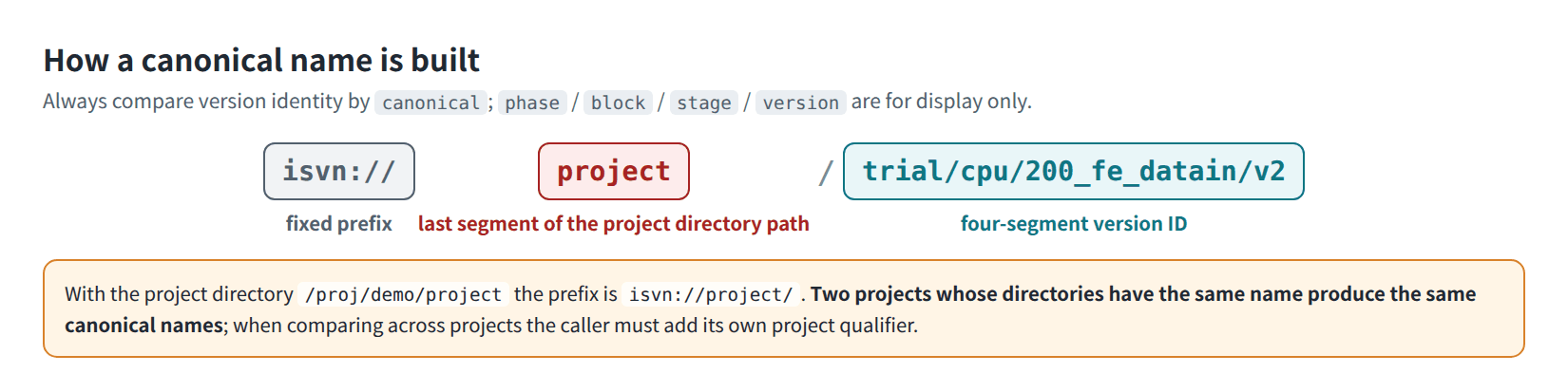
Figure Q-06. How a canonical name is built.
- Depending on the query type, the object also carries
depth(ordepth_from_subject),relation,file_stateandrole. Thesubjectofprovenance queryadditionally carriesresolved: true.
The ROOT node in legacy data: The lineage chain of an early project may use the string ROOT as its topmost parent. Such a node is output as:
{ "canonical": "isvn://<project>/ROOT", "phase": null, "block": null, "stage": null, "version": "ROOT" }
A root version created with create --parent ROOT (the current practice) does not have this node; the last element of the chain is the root version itself.
3. Version level: provenance query
The only data source is Lineage (the upstream registered when a version is created). Each version has at most one direct upstream.
Suppose the chain is base → v1 → v2 → v3 and the subject is v3:
--type |
Answers | Result |
|---|---|---|
parent |
Which version is the direct upstream | parent: a single object, or null |
ancestor-chain |
Which ancestors there are, from the upstream all the way up | ancestor_chain: an array ordered from nearest to farthest, not including the subject; also root and truncated |
root |
The earliest version of this chain | root: a single object |
pedigree |
The complete chain from the earliest version to the subject | pedigree.chain: an array ordered from farthest to nearest, including the subject; also truncated |
Values of relation: parent (depth 1), ancestor, root (the farthest one on the chain) and subject (appears only in pedigree).
When the direct upstream is also the root version, relation is parent.
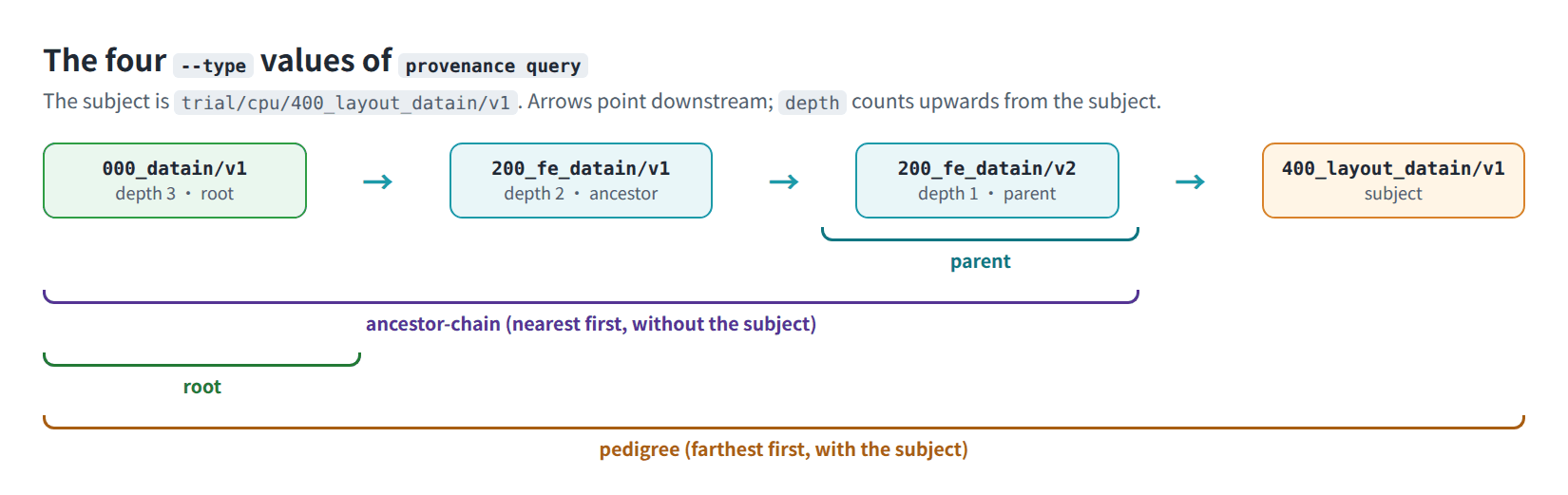
Figure Q-02. What the four --type values of provenance query cover.
3.1 ancestor-chain
This one query is all Terminux needs to decide whether the source declared by the user is the upstream, an ancestor, the root, or a mismatch.
isvn provenance query --project /proj/demo/project \
     --version trial/cpu/400_layout_datain/v1 --type ancestor-chain --json
{
  "schema_version": "isvn.provenance.query.v0",
  "authority": "declared_provenance",
  "content_verified": false,
  "status": "ok",
  "query": {
    "type": "ancestor-chain",
    "project": "/proj/demo/project",
    "version": "trial/cpu/400_layout_datain/v1",
    "max_depth": 20
  },
  "subject": {
    "canonical": "isvn://project/trial/cpu/400_layout_datain/v1",
    "phase": "trial",
    "block": "cpu",
    "stage": "400_layout_datain",
    "version": "v1",
    "resolved": true
  },
  "ancestor_chain": [
    {
      "canonical": "isvn://project/trial/cpu/200_fe_datain/v2",
      "phase": "trial",
      "block": "cpu",
      "stage": "200_fe_datain",
      "version": "v2",
      "depth": 1,
      "relation": "parent"
    },
    {
      "canonical": "isvn://project/trial/cpu/200_fe_datain/v1",
      "phase": "trial",
      "block": "cpu",
      "stage": "200_fe_datain",
      "version": "v1",
      "depth": 2,
      "relation": "ancestor"
    },
    {
      "canonical": "isvn://project/trial/cpu/000_datain/v1",
      "phase": "trial",
      "block": "cpu",
      "stage": "000_datain",
      "version": "v1",
      "depth": 3,
      "relation": "root"
    }
  ],
  "root": {
    "canonical": "isvn://project/trial/cpu/000_datain/v1",
    "phase": "trial",
    "block": "cpu",
    "stage": "000_datain",
    "version": "v1",
    "depth": 3,
    "relation": "root"
  },
  "truncated": false,
  "warnings": []
}
Guarantees:
ancestor_chaindoes not include the subject and is ordered from nearest to farthest;depthstarts at 1 and increases consecutively.depth: 1is always the direct upstream.- When there is no truncation,
rootequals the last element ofancestor_chain. - When the subject itself is a root version:
ancestor_chainis an empty array androotis the subject itself (depth: 0).
Truncation: When the number of ancestors exceeds --max-depth, truncated is true, root is null, and a warning is attached:
isvn provenance query --version trial/cpu/400_layout_datain/v1 --type ancestor-chain --max-depth 2 --json
The fields that differ from the untruncated result (ancestor_chain keeps only the nearest two):
{
  "root": null,
  "truncated": true,
  "warnings": [
    {
      "code": "MAX_DEPTH_REACHED",
      "message": "The provenance traversal reached --max-depth."
    }
  ]
}
3.2 parent
Figure Q-03 shows what an actual run looks like in a terminal (the output is formatted with python3 -m json.tool):
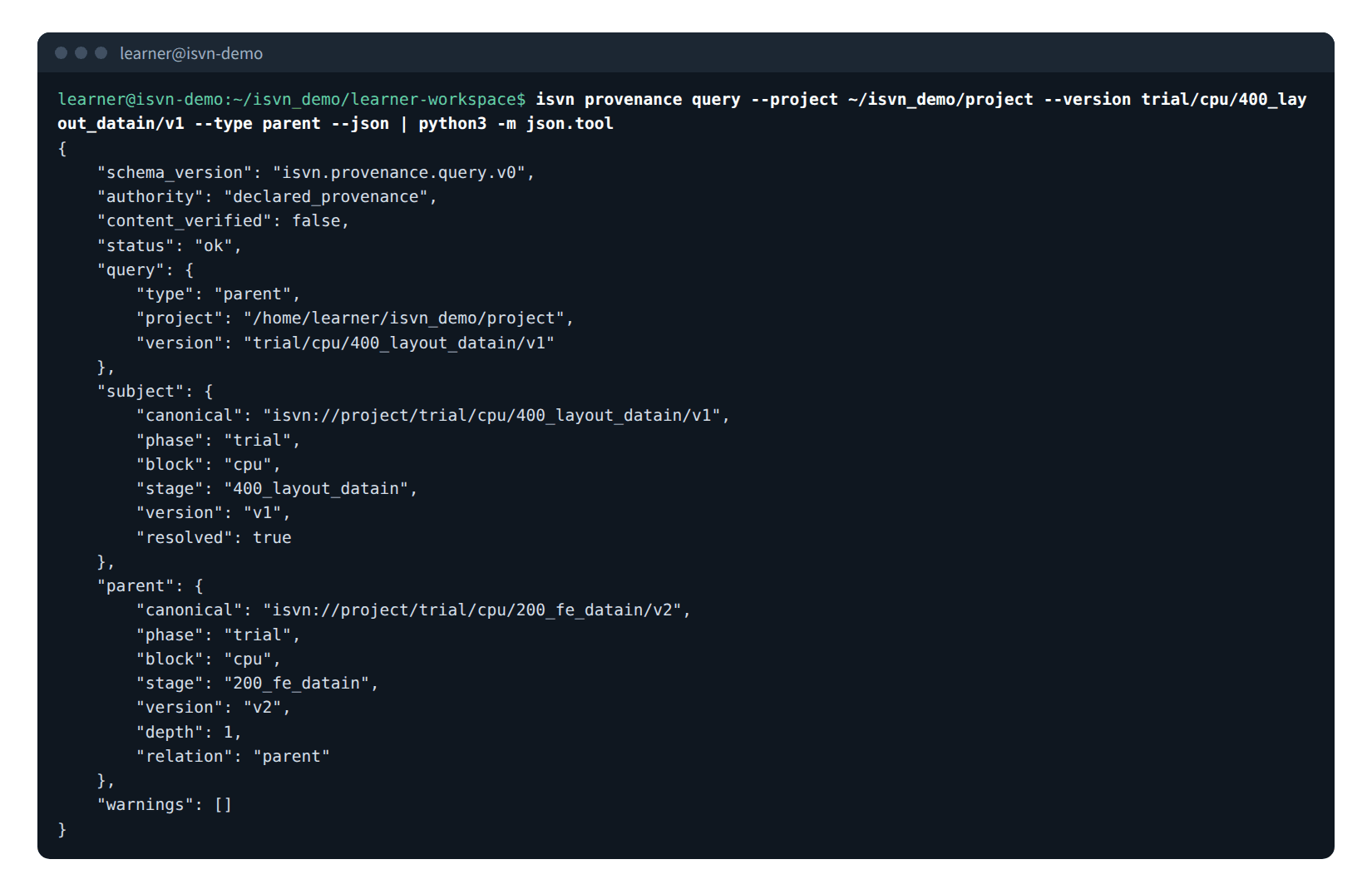
Figure Q-03. Real output of provenance query --type parent.
{
  "schema_version": "isvn.provenance.query.v0",
  "authority": "declared_provenance",
  "content_verified": false,
  "status": "ok",
  "query": {
    "type": "parent",
    "project": "/proj/demo/project",
    "version": "trial/cpu/400_layout_datain/v1"
  },
  "subject": {
    "canonical": "isvn://project/trial/cpu/400_layout_datain/v1",
    "phase": "trial",
    "block": "cpu",
    "stage": "400_layout_datain",
    "version": "v1",
    "resolved": true
  },
  "parent": {
    "canonical": "isvn://project/trial/cpu/200_fe_datain/v2",
    "phase": "trial",
    "block": "cpu",
    "stage": "200_fe_datain",
    "version": "v2",
    "depth": 1,
    "relation": "parent"
  },
  "warnings": []
}
When the subject is a root version, parent is null and the warning ROOT_VERSION is attached (excerpt; schema_version, authority, content_verified and query are omitted):
{
  "status": "ok",
  "subject": {
    "canonical": "isvn://project/trial/cpu/000_datain/v1",
    "phase": "trial",
    "block": "cpu",
    "stage": "000_datain",
    "version": "v1",
    "resolved": true
  },
  "parent": null,
  "warnings": [
    {
      "code": "ROOT_VERSION",
      "message": "This version has no declared parent."
    }
  ]
}
3.3 root
Excerpt; the same fields are omitted as above:
{
  "status": "ok",
  "subject": {
    "canonical": "isvn://project/trial/cpu/400_layout_datain/v1",
    "phase": "trial",
    "block": "cpu",
    "stage": "400_layout_datain",
    "version": "v1",
    "resolved": true
  },
  "root": {
    "canonical": "isvn://project/trial/cpu/000_datain/v1",
    "phase": "trial",
    "block": "cpu",
    "stage": "000_datain",
    "version": "v1",
    "depth": 3,
    "relation": "root"
  },
  "warnings": []
}
3.4 pedigree
The array direction is "root → subject", and the depth field is called depth_from_subject. On truncation, only the nearest --max-depth ancestors are kept and truncated is true.
Excerpt (schema_version, authority, content_verified, query and subject are omitted):
{
  "status": "ok",
  "pedigree": {
    "model": "single_parent_chain",
    "direction": "root_to_subject",
    "chain": [
      {
        "canonical": "isvn://project/trial/cpu/000_datain/v1",
        "phase": "trial",
        "block": "cpu",
        "stage": "000_datain",
        "version": "v1",
        "depth_from_subject": 3,
        "relation": "root"
      },
      {
        "canonical": "isvn://project/trial/cpu/200_fe_datain/v1",
        "phase": "trial",
        "block": "cpu",
        "stage": "200_fe_datain",
        "version": "v1",
        "depth_from_subject": 2,
        "relation": "ancestor"
      },
      {
        "canonical": "isvn://project/trial/cpu/200_fe_datain/v2",
        "phase": "trial",
        "block": "cpu",
        "stage": "200_fe_datain",
        "version": "v2",
        "depth_from_subject": 1,
        "relation": "parent"
      },
      {
        "canonical": "isvn://project/trial/cpu/400_layout_datain/v1",
        "phase": "trial",
        "block": "cpu",
        "stage": "400_layout_datain",
        "version": "v1",
        "depth_from_subject": 0,
        "relation": "subject"
      }
    ]
  },
  "truncated": false,
  "warnings": []
}
4. File level: file query
The main result of all three queries is always an array, even when there is only one entry:
--type |
Main result | Other fields |
|---|---|---|
versions |
versions[] |
summary (version_count, first_seen, latest_seen) |
parent |
parent_versions[] |
subjects[], per_subject[] |
root |
root_versions[] |
subjects[], per_subject[] |
4.1 The inventory comes from the "local workspace", not the whole project
Before you use file query, make sure you understand the scope of its inventory:
- The versions that file query examines are limited to the versions already checked out in the caller's current workspace (registered in
.isvn_local/workspaces, with a working copy that actually exists). - A version is judged to "contain this path" when the path exists in the working copy of that version.
- It does not read the SVN repository, and it does not check anything out for you.
- The path counts as long as it exists: a new file that is not yet committed and exists only in the working copy is listed too, and
managedistruejust the same. - Therefore:
file.managed: falsemeans "none of the locally checked-out versions has this path"; it does not mean that the project does not have this file.- When the command is run outside a workspace (even with
--projectgiven), the result is alwaysmanaged: false. - Switch to another workspace, or check out one more version, and the same query gives a different result.
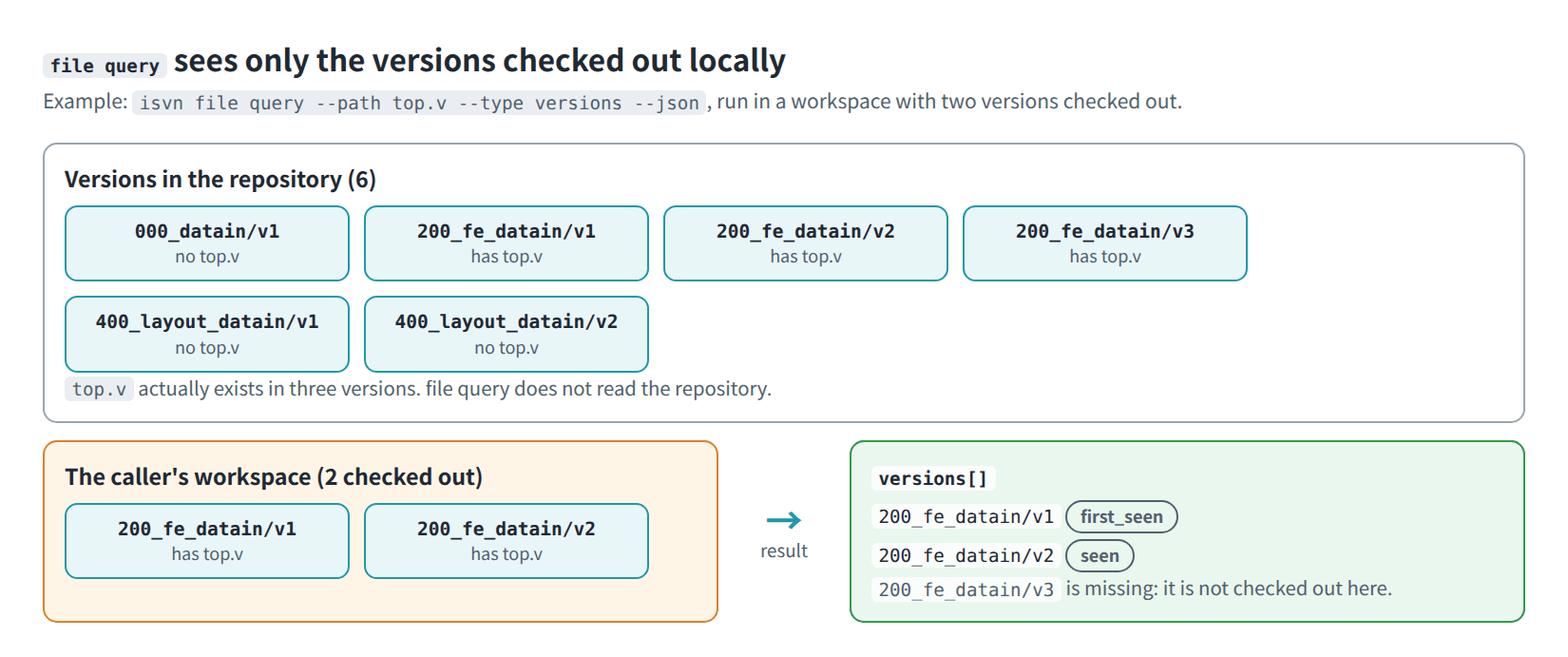
Figure Q-04. The inventory of file query: only the versions checked out in the caller's workspace.
The results for the same project and the same path, with only one version checked out and with two versions checked out:
isvn file query --path top.v --type versions --json # only 200_fe_datain/v2 is checked out
Excerpt of file, versions and summary:
{
  "file": {
    "path": "top.v",
    "managed": true
  },
  "versions": [
    {
      "canonical": "isvn://project/trial/cpu/200_fe_datain/v2",
      "phase": "trial",
      "block": "cpu",
      "stage": "200_fe_datain",
      "version": "v2",
      "file_state": "checked_in",
      "role": "first_seen"
    }
  ],
  "summary": {
    "version_count": 1,
    "first_seen": {
      "canonical": "isvn://project/trial/cpu/200_fe_datain/v2",
      "version": "v2"
    },
    "latest_seen": {
      "canonical": "isvn://project/trial/cpu/200_fe_datain/v2",
      "version": "v2"
    }
  }
}
isvn file query --path top.v --type versions --json # after also checking out 400_layout_datain/v1
{
  "schema_version": "isvn.file.query.v0",
  "authority": "declared_inventory",
  "content_verified": false,
  "status": "ok",
  "query": {
    "type": "versions",
    "project": "/proj/demo/project",
    "path": "top.v"
  },
  "file": {
    "path": "top.v",
    "managed": true
  },
  "versions": [
    {
      "canonical": "isvn://project/trial/cpu/200_fe_datain/v2",
      "phase": "trial",
      "block": "cpu",
      "stage": "200_fe_datain",
      "version": "v2",
      "file_state": "checked_in",
      "role": "first_seen"
    },
    {
      "canonical": "isvn://project/trial/cpu/400_layout_datain/v1",
      "phase": "trial",
      "block": "cpu",
      "stage": "400_layout_datain",
      "version": "v1",
      "file_state": "checked_in",
      "role": "seen"
    }
  ],
  "summary": {
    "version_count": 2,
    "first_seen": {
      "canonical": "isvn://project/trial/cpu/200_fe_datain/v2",
      "version": "v2"
    },
    "latest_seen": {
      "canonical": "isvn://project/trial/cpu/400_layout_datain/v1",
      "version": "v1"
    }
  },
  "warnings": []
}
4.2 What the fields mean
| Field | Behavior |
|---|---|
Order of versions[] |
The string order of the version IDs, not lineage order or time order |
role |
After sorting, the first entry is first_seen and the rest are seen |
summary.first_seen / latest_seen |
The first and the last entry after sorting |
file_state |
checked_in when the path is a file (the same for a LINKED symlink, a LOCAL regular file and a new file that is not yet committed), directory when it is a directory. These are the only two values: the field tells a file from a directory and does not indicate whether a file has been committed or modified |
--type versions with --version |
Checks only whether the working copy of that one version has the path: if it does, that version is returned; if it does not, the result is an empty array plus FILE_NOT_MANAGED |
subjects[] |
With --version, that version (if it contains the path); without it, all local versions that contain the path |
4.3 parent and root
For each subject, the search goes up the ancestor chain of the Lineage:
- file parent: The nearest ancestor that is "checked out locally and also contains the same path".
depthis its distance along the ancestor chain. - file root: The farthest ancestor that meets the same condition. If no ancestor meets it and the subject itself contains the path, the result is the subject itself (
depth: 0). - An ancestor that is not checked out locally is skipped, so the result may be shorter than the actual lineage.
- Only exactly identical paths are matched; renames are not tracked.
- Without
--version, each subject is computed separately, then the candidate versions are deduplicated and put intoparent_versions[]/root_versions[]; the result of each individual subject is inper_subject[].
isvn file query --version trial/cpu/400_layout_datain/v1 --path top.v --type parent --json
{
  "schema_version": "isvn.file.query.v0",
  "authority": "declared_inventory",
  "content_verified": false,
  "status": "ok",
  "query": {
    "type": "parent",
    "project": "/proj/demo/project",
    "version": "trial/cpu/400_layout_datain/v1",
    "path": "top.v"
  },
  "file": {
    "path": "top.v",
    "managed": true
  },
  "subjects": [
    {
      "canonical": "isvn://project/trial/cpu/400_layout_datain/v1",
      "phase": "trial",
      "block": "cpu",
      "stage": "400_layout_datain",
      "version": "v1",
      "file_state": "checked_in"
    }
  ],
  "parent_versions": [
    {
      "canonical": "isvn://project/trial/cpu/200_fe_datain/v2",
      "phase": "trial",
      "block": "cpu",
      "stage": "200_fe_datain",
      "version": "v2",
      "file_state": "checked_in",
      "depth": 1,
      "relation": "file_parent"
    }
  ],
  "per_subject": [
    {
      "subject": {
        "canonical": "isvn://project/trial/cpu/400_layout_datain/v1",
        "version": "v1"
      },
      "parent_versions": [
        {
          "canonical": "isvn://project/trial/cpu/200_fe_datain/v2",
          "version": "v2",
          "depth": 1,
          "relation": "file_parent"
        }
      ]
    }
  ],
  "warnings": []
}
--type root has the same structure, except that the key is named root_versions and relation is file_root.
4.4 Paths not in the inventory
When the query is valid but no local version contains the path, the exit code is still 0, the array is empty, and a warning is attached:
{
  "schema_version": "isvn.file.query.v0",
  "authority": "declared_inventory",
  "content_verified": false,
  "status": "ok",
  "query": {
    "type": "versions",
    "project": "/proj/demo/project",
    "path": "tmp/debug.log"
  },
  "file": {
    "path": "tmp/debug.log",
    "managed": false
  },
  "versions": [],
  "summary": {
    "version_count": 0,
    "first_seen": null,
    "latest_seen": null
  },
  "warnings": [
    {
      "code": "FILE_NOT_MANAGED",
      "message": "The file path is not managed by isvn."
    }
  ]
}
In this situation a parent / root query outputs subjects: [], an empty parent_versions (or root_versions) and per_subject: [].
4.5 The version that holds a path: file locate
file locate answers "in which version's working copy is this path, and what is its coordinate". Use it when an external tool only has an absolute path:
isvn file locate --path /proj/demo/ws/trial/cpu/200_fe_datain/v2/top.v --json
{
  "schema_version": "isvn.file.locate.v0",
  "authority": "declared_inventory",
  "content_verified": false,
  "status": "ok",
  "query": {
    "type": "locate",
    "path": "/proj/demo/ws/trial/cpu/200_fe_datain/v2/top.v"
  },
  "managed": true,
  "project": {
    "dir": "/proj/demo/project",
    "name": "project"
  },
  "version": {
    "canonical": "isvn://project/trial/cpu/200_fe_datain/v2",
    "phase": "trial",
    "block": "cpu",
    "stage": "200_fe_datain",
    "version": "v2"
  },
  "file": {
    "path": "top.v",
    "kind": "file",
    "link_state": "LINKED",
    "working_copy": "/proj/demo/ws/trial/cpu/200_fe_datain/v2"
  },
  "warnings": []
}
--pathmay be absolute or relative to the current directory. isvn walks up from the path to the workspace and uses that workspace's list of versions (.isvn_local/workspaces) to find the version that contains the path; the caller does not have to run inside a workspace or name the project.- If the folders above the path are reached through a link (for example a workspace in a linked directory), isvn resolves those folders; the path itself is not resolved, so a LINKED file reports the version it is in, not the pool.
- The result is unique: only the working copy that contains the path counts; other checked-out versions do not affect it.
--projectis optional and is a check: when it is given and differs from the project directory that was found, the command returns the errorPROJECT_MISMATCH(exit code 2).- The command is read-only: it does not read file content, contact SVN or read Lineage, and it changes nothing.
| Field | Meaning |
|---|---|
managed |
the path is in the working copy of a version and exists |
project.dir, project.name |
the project directory, and the name used in canonical |
version |
the version that holds the path, in the format of section 2.1 |
file.path |
the path relative to the version root; usable as file query --path |
file.kind |
file, directory, link (a link that does not point into the pool) or absent |
file.link_state |
LINKED (pool link), LOCAL (regular file); empty for folders and other links |
| Warning | Case | managed |
|---|---|---|
PATH_NOT_IN_VERSION |
the path is not in any version checked out in a workspace; project, version and file are null |
false |
FILE_NOT_FOUND |
the path is inside a version but does not exist | false |
VERSION_ROOT |
the path is the root folder of the version | false |
5. Errors, warnings and exit codes
| Situation | Output location and format | Exit code |
|---|---|---|
| Success (including "not in the inventory") | stdout, a single JSON document, status: "ok" |
0 |
Argument error: --type / --version / --path is missing, --type is invalid, --max-depth is not a positive integer, --path is an absolute path or contains .., the version ID of provenance query does not have four segments |
stdout, isvn.error.v0 |
2 |
provenance query cannot find the version |
stdout, isvn.provenance.query.v0, status: "error", error.code: "VERSION_NOT_FOUND" |
2 |
| The lineage data contains a cycle | Same as above, with error.code: "PROVENANCE_CYCLE_DETECTED"; other traversal failures are PROVENANCE_QUERY_FAILED |
2 |
No --json |
stderr, plain text | 1 |
| The project directory cannot be found | stderr, plain text | 1 |
The --version of file query does not have four segments, or that version is not checked out locally |
stderr, plain text, for example isvn: version is not checked out in this workspace; run isvn checkout <version> first |
1 |
Handling rule for the caller: when the exit code is not 0, stdout is not necessarily JSON. Check the exit code first, then parse.
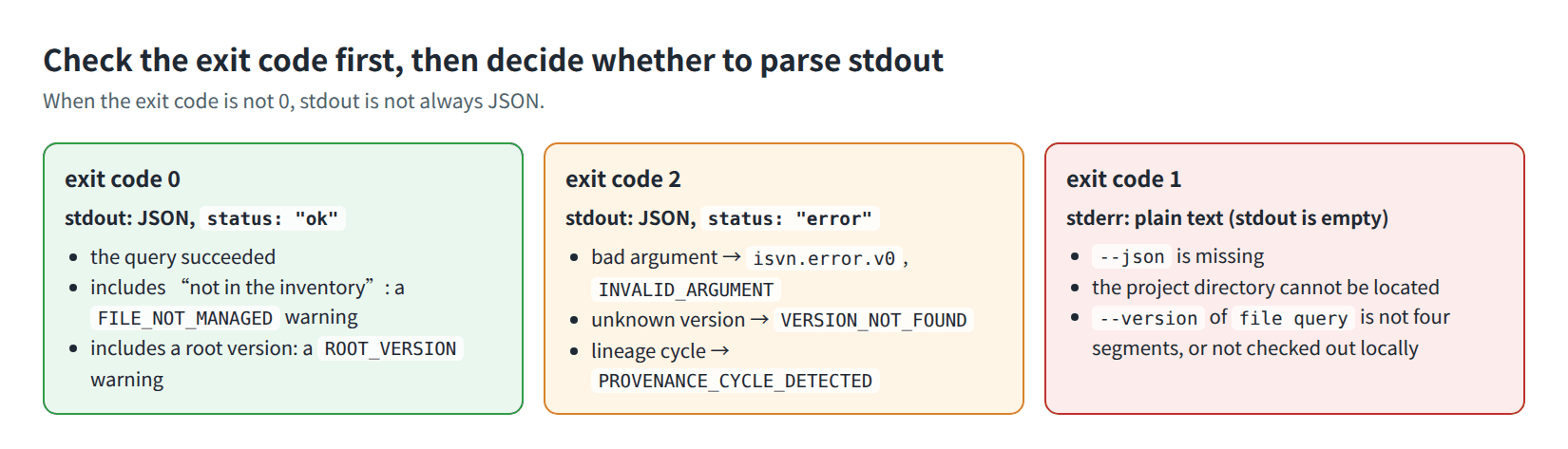
Figure Q-05. The three exit codes and where their output goes.
What the three cases look like in a terminal:
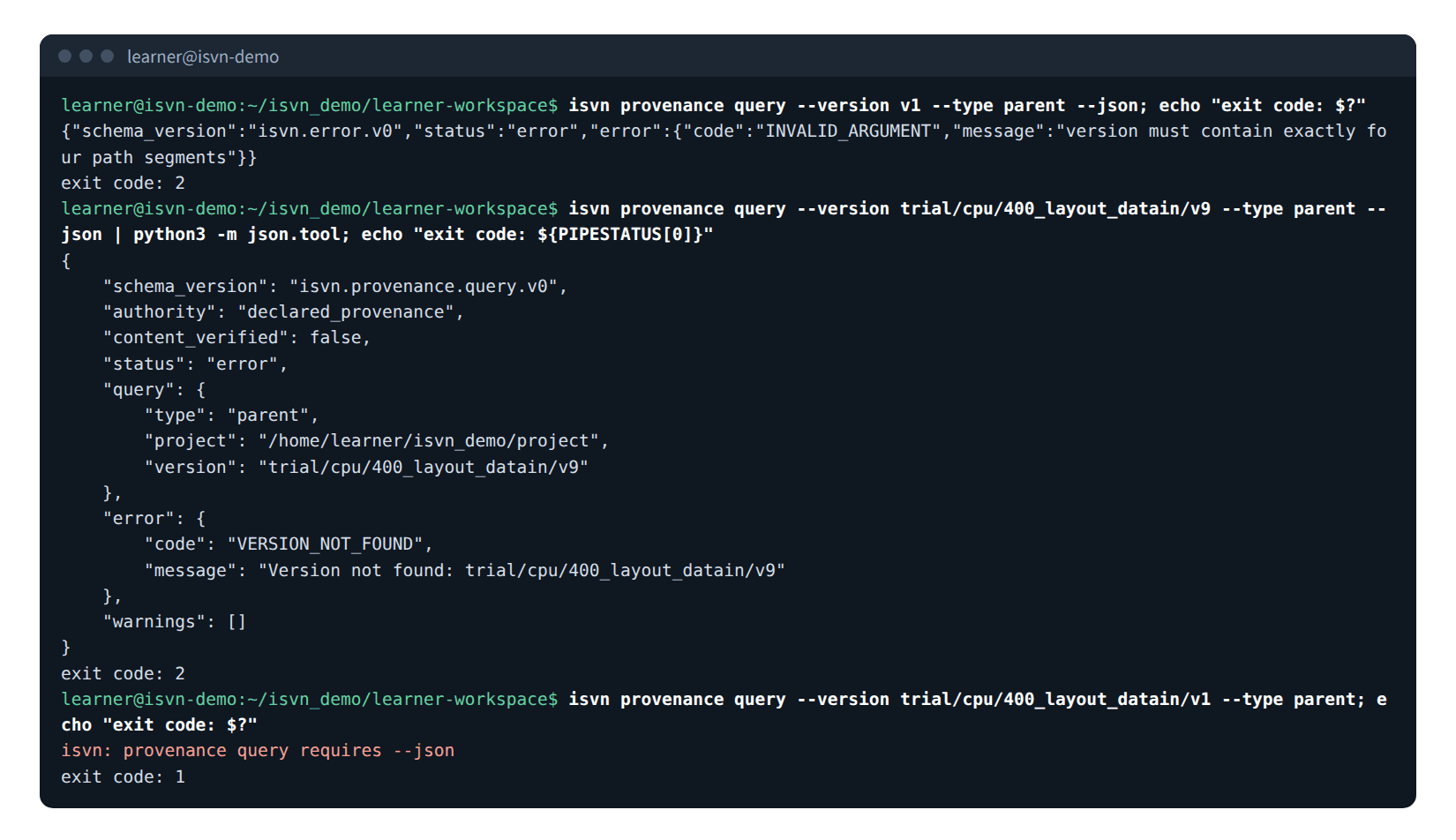
Figure Q-09. Real output for a bad argument (exit code 2), an unknown version (exit code 2) and a missing --json (exit code 1).
The format of an argument error:
{
  "schema_version": "isvn.error.v0",
  "status": "error",
  "error": {
    "code": "INVALID_ARGUMENT",
    "message": "version must contain exactly four path segments"
  }
}
Version not found:
{
  "schema_version": "isvn.provenance.query.v0",
  "authority": "declared_provenance",
  "content_verified": false,
  "status": "error",
  "query": {
    "type": "parent",
    "project": "/proj/demo/project",
    "version": "trial/cpu/400_layout_datain/v9"
  },
  "error": {
    "code": "VERSION_NOT_FOUND",
    "message": "Version not found: trial/cpu/400_layout_datain/v9"
  },
  "warnings": []
}
Warning codes (warnings[].code):
| Code | When it appears |
|---|---|
ROOT_VERSION |
--type parent, and the subject has no upstream |
MAX_DEPTH_REACHED |
ancestor-chain / pedigree is truncated by --max-depth |
FILE_NOT_MANAGED |
file query finds no local version that contains the path |
6. Compatibility
- Query results are JSON, and
schema_versionholds the names shown in sections 3 to 5:isvn.provenance.query.v0,isvn.file.query.v0andisvn.error.v0. - Later versions may add fields. Callers must ignore fields they do not recognize and must not depend on the order of keys.
7. Rules for the caller
Compare version identity with canonical.
Classify with depth/relation (upstream, ancestor, root).
phase/block/stage/version are for display only.
Recommended order for completing the classification with a single ancestor-chain query (declared is the canonical of the source version declared by the user):
declared == the canonical at depth 1 in ancestor_chain  → match_parent
declared == root.canonical (root is not null)           → match_root
declared appears among the canonicals of ancestor_chain → match_ancestor
truncated is true and none of the above matches         → inconclusive; increase --max-depth and query again
otherwise                                               → mismatch_declared_source
To find the version that holds a file, use file locate (section 4.5) rather than taking versions[0] from file query: versions[] is ordered by the string order of the version IDs and contains only the versions checked out in the caller's workspace (see sections 4.1 and 4.2).
7.1 Terminux DQE check-in
When Terminux writes a DQE package into a version, it calls isvn in this order:
- It lists the files of the version with
isvn status --json; the entries whoselink_stateisLINKEDare the managed files, andfiles[].pathis the path relative to the version directory. - It runs
isvn editon the managed files that it is going to overwrite. - It writes the files of the package.
- It runs
isvn checkin <file> --to <version>for each file.
The single-path isvn checkin commits only the given path; the other LINKED files in the working copy are untouched. Folders above a new file that are not in the repository yet (for example attachments/) are committed with it. After the commit, the files are LINKED again (see isvn User Guide, section 19.2).
The call sequence and the three outcomes are shown in Figure Q-07; all three outcomes are successful:
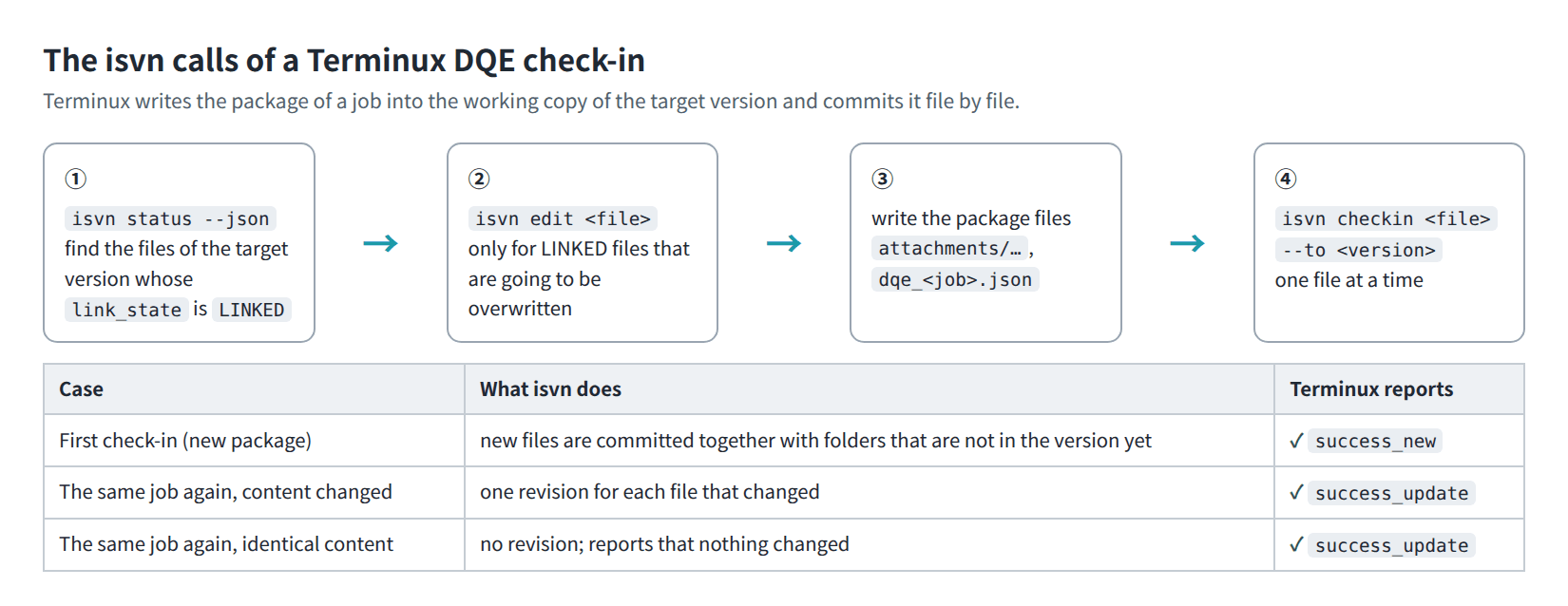
Figure Q-07. The call sequence of a Terminux DQE check-in, and the outcome in three cases.
| Situation | Result |
|---|---|
| First check-in | Every file of the package is committed |
| Same job checked in again, with changes | Only the changed files get a new revision, for example only the JSON of the package when a value changed; files whose content did not change report no changes |
| Same job checked in again, without changes | No revision is created; the isvn checkin of every file ends with exit code 0 and prints no changes in <name> compared with <version>; nothing was committed (with --json: "result":"unchanged","revision":null) |
8. GUI entry point
The Explore page of the GUI (Workspace B — Lineage & Evidence Explorer) uses the same two command groups:
- Version Lineage: Parent, Ancestor Chain, Root, Pedigree.
- File Lineage: Versions, Parent Versions, Root Versions.
- The screen always shows Declared provenance or Declared inventory, together with Not content-verified.
- The query result is drawn as a relationship graph; clicking a node shows its canonical and other information in the Node Inspector.
- File Lineage in the GUI likewise looks only at the locally checked-out versions.
Figure U-24 shows the query result of Version Lineage (Ancestor Chain), and Figure U-25 shows the query result of File Lineage (Versions); both figures also appear in isvn User Guide, section 14 of the isvn User Guide.
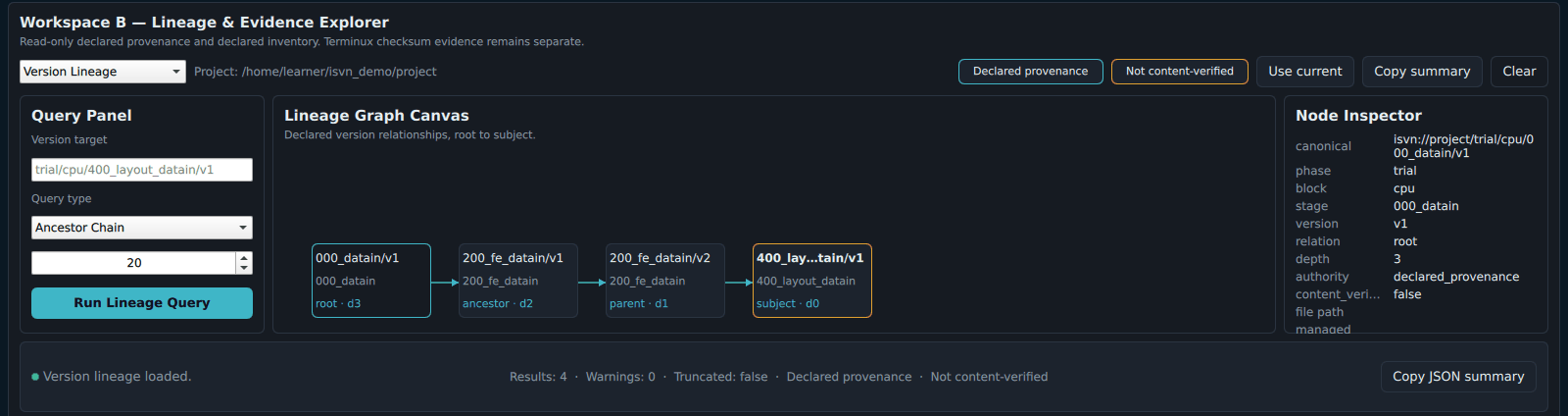
Figure U-24. Result of a version lineage query (Ancestor Chain): the lineage graph and the Node Inspector.
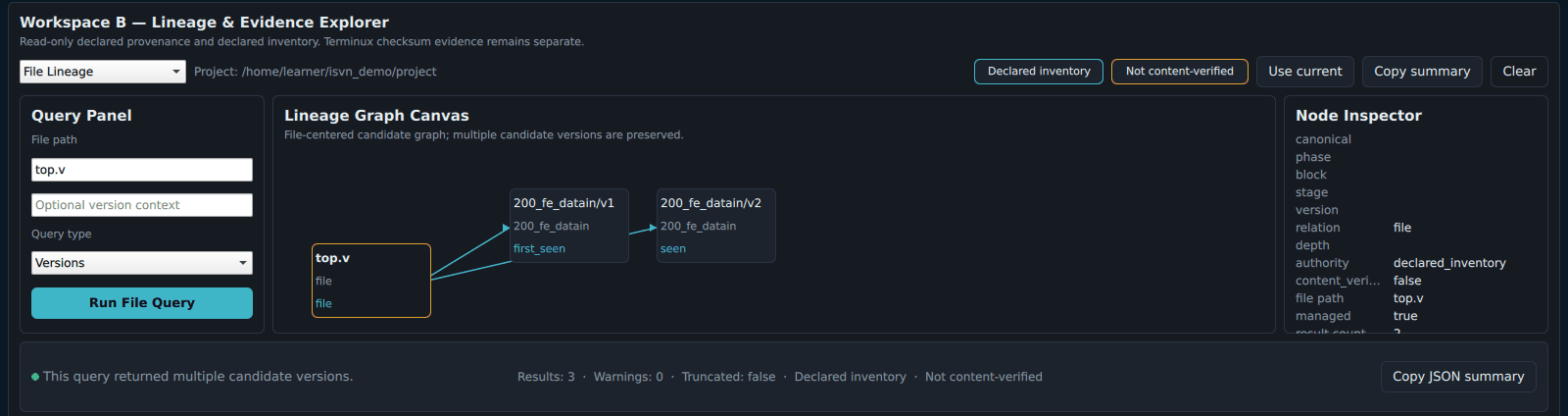
Figure U-25. Result of a file lineage query (Versions): top.v is found in the two versions checked out locally.
9. Tests and evidence
Both command groups have automated tests that cover the seven query types, root versions, --max-depth, version not found, paths not in the inventory, and the ROOT node in legacy data. The JSON examples and the terminal figures in this document are the output of actual runs on a demo project.
10. Scope
isvn provenance query answers lineage at the version level: the upstream that users declared when they created a version, and the ancestor chain, root and pedigree built from it. isvn file query answers presence at the file level: in which of the versions checked out in the caller's workspace a path appears, and the file parent and file root found along the declared lineage. isvn file locate answers in which version's working copy a path lies. Whether the file content really comes from the declared source is answered by the Terminux checksum ledger (see section 1.1).